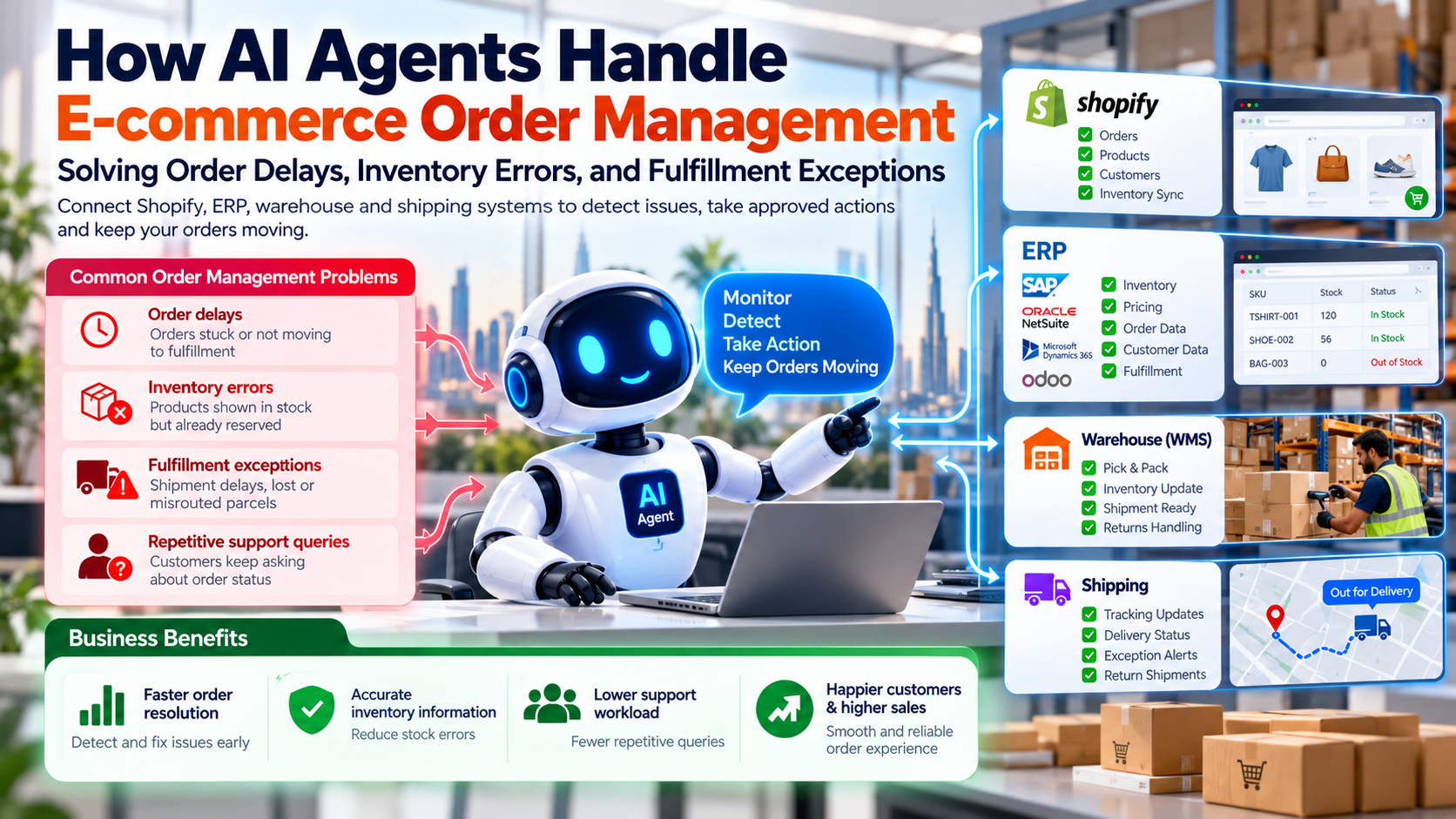
Your customers don't want another automated conversation. They want their orders delivered, their problems solved, and their questions answered without waiting for hours.
But what happens when a customer asks where their package is, another requests a refund, and a third needs help choosing the right product, all at the same time?
Your support team may end up checking order records, searching inventory systems, explaining return policies, and updating customer tickets manually. As your online store grows, these repetitive tasks can consume valuable time and create frustrating customer experiences. AI customer support automation is built for exactly this problem.
This is where the AI chatbot vs. AI agent question becomes important.
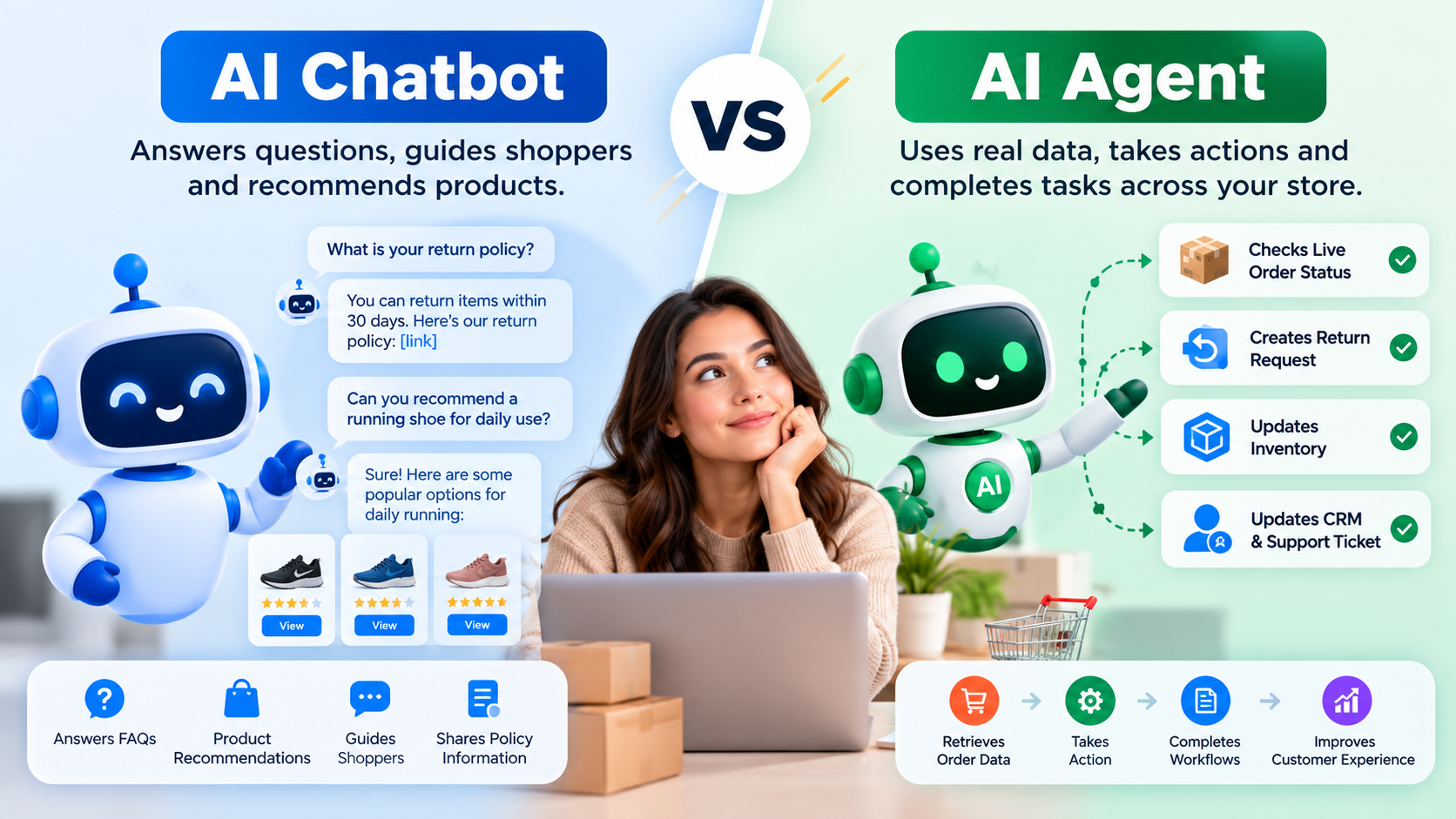
An AI chatbot for ecommerce can answer questions, guide shoppers, and recommend products. AI agents for ecommerce can go further by using connected business systems to retrieve information, coordinate workflows, and complete authorized tasks.
The real question isn't which technology is more advanced. It's which one can solve your online store's biggest business problem.
In this guide, you'll learn how AI chatbots and AI agents differ, where each delivers value, how they integrate with ecommerce platforms, and how to choose the right solution without investing in unnecessary complexity.
What is an AI chatbot for ecommerce?
An AI chatbot is software that talks with people in natural language. It reads a shopper's message, works out what the shopper wants, and replies. Most modern chatbots use natural language processing and large language models to handle varied wording, so a customer does not need to type a specific command.
The goal of a chatbot is conversation. It answers questions, guides the shopper through a process, and hands off to a person when it cannot help. For ecommerce, this usually means product discovery, policy guidance, and routine support.
How does an ecommerce AI chatbot work?
A typical chatbot follows a simple loop:
- It receives a customer question on the website, in a messaging app, or in a support widget.
- It identifies the customer's intent, such as a shipping question or a request for a size guide.
- It retrieves relevant information from approved sources, such as a policy page, a product catalog, or a knowledge base.
- It generates a reply or follows a defined conversation flow.
- It escalates the conversation to a person when the question is outside its scope or the customer asks for one.
What can an AI chatbot do for an online store?
A well-configured chatbot can answer shipping and delivery questions, explain return and exchange policies, help shoppers compare products, recommend items based on stated preferences, and answer sizing and feature questions. It can also collect the details a support agent will need, so the customer does not repeat themselves after a handoff.
Where does an AI chatbot fall short?
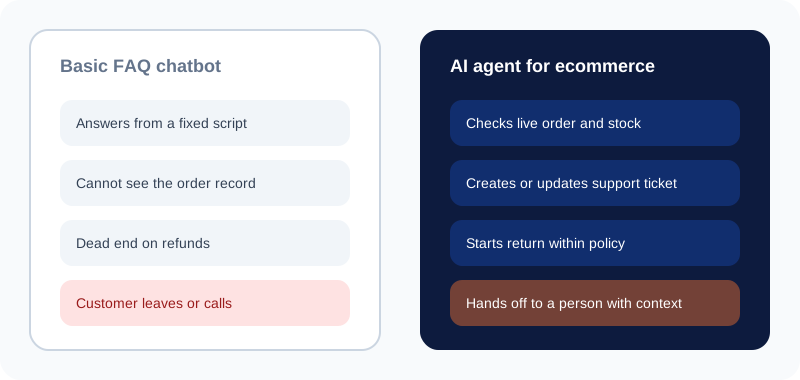
A chatbot that only reads a knowledge base cannot see a customer's actual order. It may not be able to check live stock, update a shipping address, or start a return. In those cases, the chatbot can explain what should happen, but it cannot finish the task.
Be careful with labels here. Some modern chatbots include integrations and can take actions. The real question is not what a product is called, but what the deployed system is authorized and configured to do.
What is an AI agent for ecommerce?
An AI agent is a system built to reach a goal by using tools. IBM describes AI agents as systems that autonomously perform tasks by designing workflows with available tools. In an online store, those tools are usually connections to your platform, order system, inventory data, shipping provider, and CRM.
The defining feature is not better conversation. It is the ability to gather information from connected systems, decide on an allowed next step, and carry that step out within the permissions it has been given.
How does an AI agent work?
A practical agent follows six stages:
- It understands the customer's request or the operational goal.
- It determines what information is required.
- It retrieves records through approved APIs or tools.
- It chooses an allowed next step.
- It executes the step, or requests human approval when the step is sensitive.
- It checks the outcome and communicates the result.
Ecommerce AI agent use cases
- Retrieve order information from an order management system.
- Check return eligibility against your written store policy.
- Create a return request when the policy and permissions allow it.
- Update a CRM record or support ticket with the conversation summary.
- Coordinate shipping information with the support team.
- Flag an inventory discrepancy for investigation.
What makes an AI agent different from a chatbot?
IBM also points out that AI agents differ from conversational assistants in how they act. Assistants typically wait for direction, while AI agents are primarily proactive, autonomously planning and taking actions to achieve a defined goal. For a store owner, the practical difference is this: a chatbot explains what to do next, while an agent can take the permitted next step itself.
Consider a customer who reports that an order arrived damaged. A basic chatbot might explain the return policy and ask the customer to email photos. An integrated agent could retrieve the order, record the damage report, check return eligibility, create a case, and route a refund request for approval. The customer gets a clearer path, and your team gets complete information.
Agents do not automatically issue refunds or change orders. Those capabilities require suitable integrations, business rules, and authorization.
AI chatbot vs. AI agent: key differences
The table below answers the main question quickly.
| Feature | AI chatbot | AI agent |
|---|---|---|
| Primary purpose | Customer conversation | Goal-oriented task execution |
| Customer FAQs | Well suited | Can also handle them |
| Product recommendations | Can suggest products | Can combine preferences with connected product and stock data |
| Order tracking | Answers from available order data | Retrieves and coordinates order information |
| Returns and refunds | Explains policies and guides the request | Carries out permitted workflow steps |
| System integrations | Optional, depending on design | Often central to multi-step workflows |
| Complex tasks | May need a human | Coordinates several permitted steps |
| Oversight | Depends on risk and design | Essential for actions with business impact |
| Implementation effort | Often simpler to start | Usually more workflow and integration work |
| Best starting point | FAQs and routine conversations | Repetitive, multi-step operational tasks |
Three simple rules follow from the table:
- Choose a chatbot when the main problem is answering repetitive customer questions.
- Choose an AI agent when the main problem is coordinating actions across systems.
- Consider both when the store needs natural conversations and connected operational workflows.
Real ecommerce problems each solution can solve
The best way to compare the two is to start from the problem. The table below shows how each approach handles five common situations.
| Business problem | Chatbot approach | Agent approach |
|---|---|---|
| Customers keep asking about delivery | Explains shipping policy and shows how to find tracking | Retrieves current tracking and coordinates exception handling |
| Customers want to return a product | Explains return rules and collects details | Checks eligibility and starts the return workflow when authorized |
| Shoppers cannot choose a product | Answers feature and sizing questions | Combines the shopper's needs with connected product data to suggest suitable options |
| Stock information is inconsistent | Explains the availability shown in the connected data | Compares approved data sources and flags discrepancies |
| A case needs several teams | Collects details and routes the conversation | Creates tickets and coordinates approved updates across systems |
Product discovery
A shopper asks for a lightweight waterproof jacket under a set budget. A chatbot can ask two or three clarifying questions and suggest items from the catalog. This is the core job of an AI shopping assistant, which keeps the conversation focused on what the shopper actually needs. An agent can go further by checking which items are in stock in the shopper's region and comparing them with the shopper's stated preferences. Many stores present this as AI-powered product recommendations, and the outcome is a better match only if the stock data is reliable.
Order tracking and delivery exceptions
For a standard delivery question, a chatbot may be enough. For a delivery exception, such as a shipment that has not moved for several days, an agent can check the carrier record, compare it with the expected milestones, and route the case to the fulfillment team with the evidence attached. Teams that handle this at volume often build automated order management around these checks, so exceptions reach the right person without manual searching.
Returns and refunds
A chatbot can explain the returns policy clearly. An agent can check the purchase date, product category, and condition against the policy, then start an approved return. Refund approval should remain under defined rules. Disputed claims and unusual amounts belong with a person.
Inventory discrepancies
When the storefront shows an item as available but the warehouse disagrees, a chatbot can only pass along the conflict. An agent can compare the approved data sources, identify which record is out of date, and flag the discrepancy for correction, without silently changing stock figures.
Support ticket escalation
A chatbot that cannot resolve a question should hand off well. An agent can go further by creating a ticket that contains the order number, the conversation summary, the steps already tried, and the customer's preferred resolution. The support agent starts with context, not a blank screen.
For each of these problems, the value comes from fewer repeat contacts, faster routing, and clearer information. Be cautious about any promise of guaranteed revenue growth or cost savings. Those results need evidence from your own store.
A real-world workflow: resolving a stalled delivery step by step
This example shows how a chatbot and an agent handle one case together. It is an illustrative scenario for a mid-size apparel store, not a reported customer result. The thresholds and approval limits are examples. Your own rules would be set during implementation.
The situation: A shopper writes, "My order shipped four days ago and the tracking has not changed. Where is it?" The order was placed on Shopify, the warehouse confirmed dispatch in the ERP, and the carrier holds the shipment's scan history.
- The chatbot verifies the shopper. It asks for the order number and sends a one-time code to the email address on the order. It shares no order details until the code is confirmed.
- The agent retrieves the order. Through the store's API, it reads the order status, fulfillment record, carrier name, and tracking number. The order shows as fulfilled and dispatched.
- The agent checks the carrier record. The last scan was four days ago at a regional sorting facility, and nothing has been recorded since.
- The agent applies the store's rule. For example, a shipment with no scan for three business days counts as an exception. This shipment meets that rule, so the agent flags it rather than guessing at a cause.
- The agent opens a case. It creates a helpdesk ticket with the order number, dispatch date, tracking history, the customer's message, and the steps already taken. The fulfillment team receives the case with all the evidence attached.
- The customer gets an honest update. The chatbot explains that the shipment is under investigation with the carrier, that a person will follow up within the timeframe in the store's policy, and how to reach a team member.
- A person decides the next step. If the carrier confirms the parcel is lost, a support lead approves a replacement or refund. Within approved limits, the agent can prepare the replacement order, but a person releases it.
- Every step is logged. The audit trail shows what the chatbot said, which data the agent read, which rule applied, and who approved the outcome.
The shopper gets a clear answer quickly, the support team starts with complete information, and the exception is handled under a written rule rather than memory. The process only works if carrier and warehouse data are accurate, and if the agent says "I cannot confirm" when a system does not respond. If the carrier API is down, the agent should say so and route the case to a person.
Which solution works best with Shopify, ERP, CRM, and inventory systems?
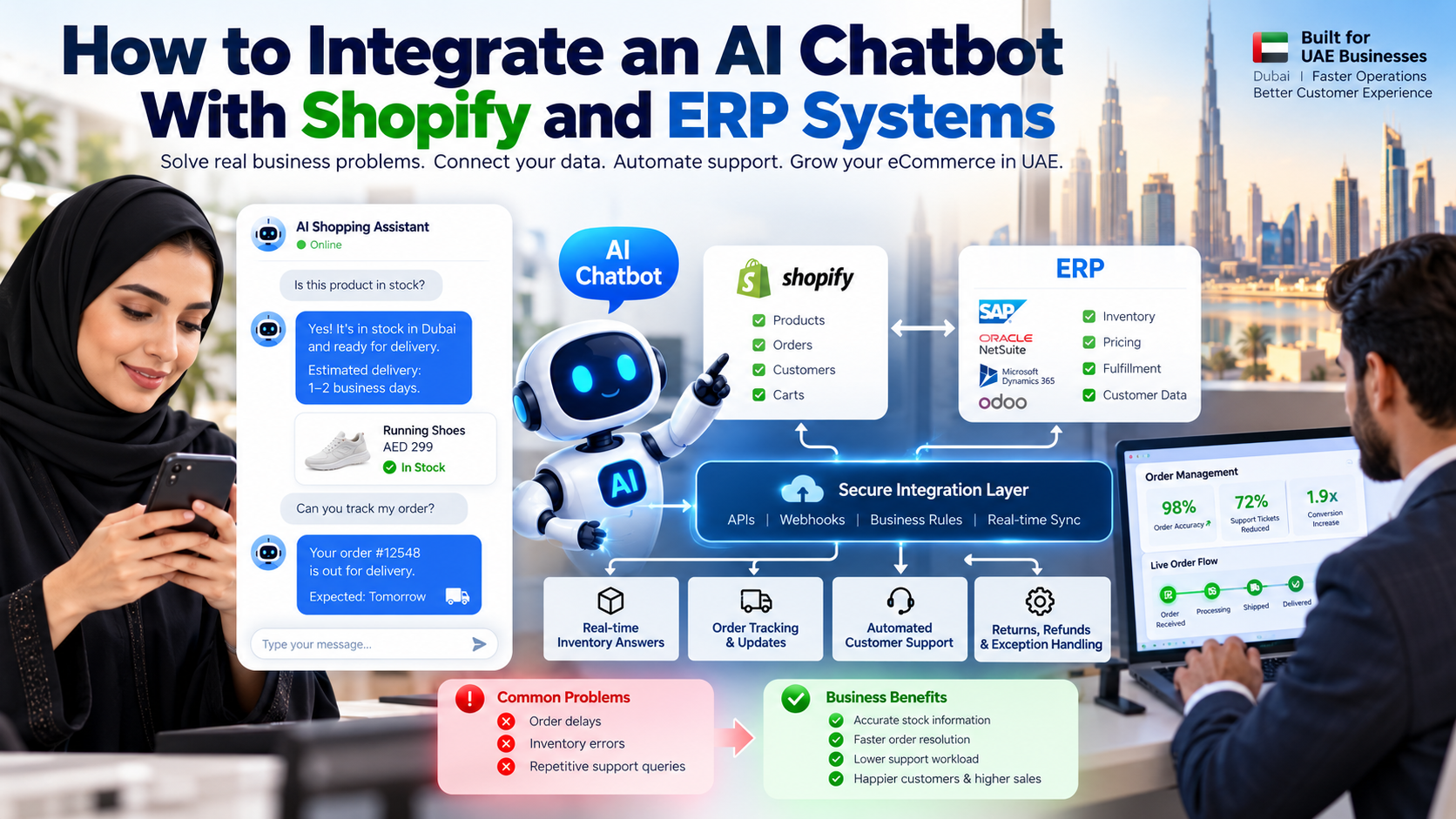
Integration matters more than the label. A chatbot with no access to your order data cannot answer order questions reliably. An agent with weak access to your inventory system may coordinate the wrong action. The fit depends on how your systems connect. A typical ecommerce stack includes:
- Shopify or another commerce platform for products, carts, orders, and customers.
- An ERP for operational and financial records, including pricing and fulfillment.
- A CRM for customer history and support context.
- An inventory system for stock levels and availability.
- A shipping provider for tracking and delivery events.
- A helpdesk for tickets and escalation.
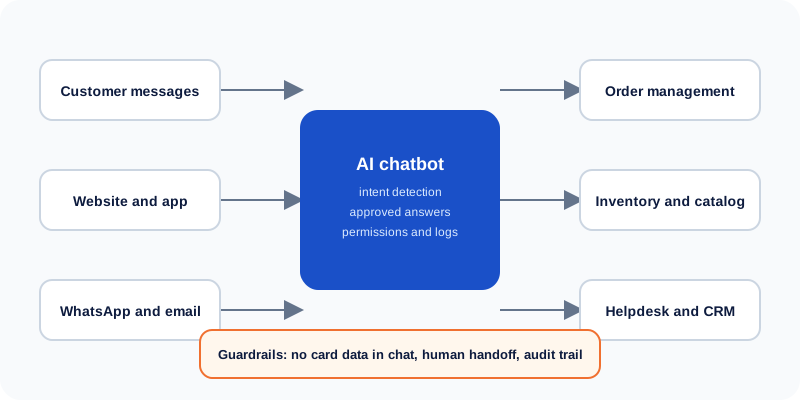
An AI agent can coordinate information across these systems, provided the necessary APIs and permissions are available. Where a system lacks suitable access, the agent should say what it cannot confirm rather than guess.
How to connect ecommerce AI to business systems safely
Before connecting any AI tool to your systems, check five things:
- API availability. Can the system expose the data and actions you need?
- Permissions. Does each connection have only the access it needs?
- Identity verification. Does the customer confirm who they are before private details appear?
- Reliable source data. Which system is the authority for stock, prices, and order status?
- Error handling and logs. What happens when a call fails, and can you see what the AI did?
A fallback workflow is essential. If the agent cannot reach the inventory system, the customer should receive an honest message and a route to a person, not a made-up stock figure.
If you need help designing these connections, our AI agent development services cover discovery, integration, guardrails, and testing for ecommerce workflows.
AI chatbot vs. AI agent: cost, complexity, and ROI
No universal price applies to every store. The cost depends on the work you want to automate and the systems involved.
The main cost factors are:
- Software subscriptions and usage charges, which may depend on conversation volume or model usage.
- Initial development and integration, including connecting order, inventory, and CRM data.
- Data cleanup and knowledge-base preparation, such as updating policies and product content.
- Testing and security controls, including permission design and audit logging.
- Ongoing monitoring and maintenance, as products, policies, and systems change.
- Human review and exception handling, which remains necessary for sensitive cases.
A chatbot focused on FAQs usually costs less to start than an agent that coordinates several systems. An agent may save more time on complex workflows, but it also needs more integration work and more oversight. Compare the two on the same basis.
To judge the value, use this simple formula:
In plain terms, net benefit equals measured benefits minus total implementation and operating costs.
Measured benefits might include staff time saved on repetitive tickets, faster routing of exceptions, and fewer errors from manual copying. Do not count the same hour twice, and do not count benefits you have not measured.
Start with a pilot. Track resolution rate, escalation rate, task completion, error rate, customer satisfaction, and cost per resolved issue. Use those results to decide whether to expand.
Risks, limitations, and security considerations
AI tools can give wrong answers and take wrong actions. Plan for that from the start. Gartner's June 25, 2025 press release, predicts that over 40% of agentic AI projects will be canceled by the end of 2027, citing rising costs, unclear business value, and weak risk controls. This is a forecast rather than a measured result, but it is a useful reminder to start with a narrow pilot and clear controls.
Incorrect answers and actions
Ground answers in approved data. For important actions, such as a refund or a change to an order, verify the state of the record before and after the change.
Customer data privacy
Restrict access to personal and payment information. Share only what a given task needs, and follow the privacy requirements that apply to your business and customers.
Refund and order modification risks
Set permission limits and approval thresholds. A refund above a set amount, or any change to a paid order, should route to a person.
Prompt injection and unauthorized tool use
Customers can type anything into a chat. Treat customer-provided text as untrusted input. Enforce permissions outside the language model, so that a clever message cannot make the system do something it is not allowed to do.
Human escalation
Route disputed refunds, suspected fraud, unusual orders, and unresolved issues to trained employees. Escalation should be a designed path, not an afterthought.
AI automation should operate within clear business rules. It should not replace those rules.
Can an online store use both an AI chatbot and an AI agent?
Yes, and for many stores this is the most practical design. The chatbot handles the conversation, and the agent handles the connected work behind it.
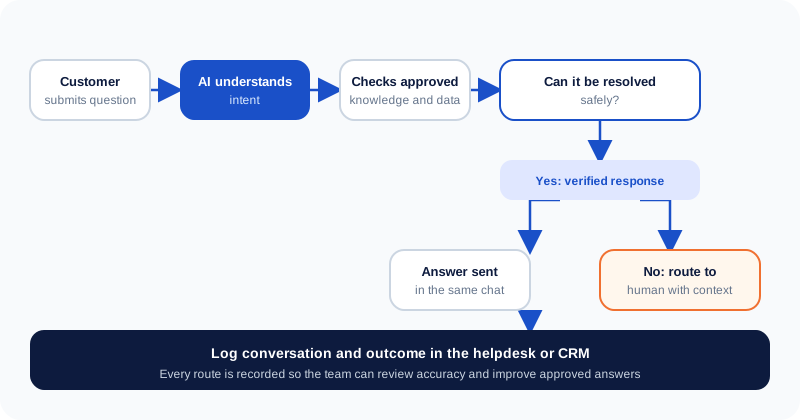
A combined flow typically works like this:
- The customer starts a conversation with the chatbot.
- The chatbot identifies the request.
- A connected agent retrieves information or begins an approved workflow.
- The system verifies the result.
- The customer receives an update, or the case moves to a human.
Consider a few examples. For order tracking, the chatbot asks for the order number and verifies the customer, then the agent retrieves the status. For a return, the chatbot explains the policy and collects the reason, then the agent checks eligibility and starts the approved request. For product recommendations, the chatbot learns the shopper's needs, and the agent checks stock and suggests matching items. For support tickets, the chatbot gathers details, and the agent creates a complete case.
Gartner's March 5, 2025 press release, predicts that agentic AI will autonomously resolve 80% of common customer service issues without human intervention by 2029. Treat that figure as a forecast and a direction to test, not a guaranteed result for your store.
A combined system is not always necessary. If your store mainly needs answers to a fixed set of questions, a well-designed chatbot may be enough. Add an agent when a specific workflow repeatedly needs several systems and clear rules.
How to choose the right AI solution for your online store
Use the following guide to decide.
Choose an AI chatbot if:
- Most customer requests are predictable questions.
- You mainly need product discovery and policy guidance.
- Your integration requirements are limited.
- You want to test demand before investing in more complex automation.
Consider an AI agent if:
- Employees repeatedly carry out the same multi-step tasks.
- The information they need sits across several systems.
- Your workflows have clear rules and measurable outcomes.
- Your APIs and business processes support safe execution.
Consider both if:
- You need a single, consistent customer conversation.
- You also need connected operational workflows.
Whichever you choose, start with one narrow, measurable use case. A pilot on order status questions, or on return eligibility checks, tells you more than a plan to automate the whole store at once.
Implementing ecommerce AI automation with Cor Advance Solutions
Good automation starts with the business problem, not the tool. Our approach at Cor Advance Solutions typically follows these steps:
- Identify the repetitive customer service and operations problems that cost the most time.
- Map the data sources and systems involved.
- Choose a chatbot, an agent, or a combined design that fits the work.
- Configure permissions, approval steps, and escalation rules.
- Test the workflow against realistic customer scenarios.
- Measure performance before expanding to other processes.
If your online store is spending too much time on repetitive support requests or manual order workflows, explore our AI agent development services to discuss an automation approach suited to your business. We will be honest about what is feasible, and we will not guarantee outcomes before we understand your systems.
Frequently asked questions
What is the difference between an AI chatbot and an AI agent?
An AI chatbot primarily communicates with customers by answering questions, providing information, and guiding conversations. An AI agent can also use connected tools to complete permitted tasks across business systems. For example, a chatbot may explain a return policy, while an AI agent may check return eligibility and create a return request. The actual capabilities of either solution depend on its integrations, permissions, and configuration.
Does an online store need an AI chatbot or an AI agent?
An online store needs an AI chatbot when its main goal is to answer routine questions and help shoppers find products. An AI agent is more suitable when the business needs to automate multi-step workflows involving orders, inventory, or customer records. Stores that need both conversational support and operational automation can combine the two. The best choice depends on business needs, available data, implementation costs, and risk tolerance.
Can an AI agent manage Shopify orders?
An AI agent can support Shopify order management when it has access to the required store data and authorized tools. Depending on the integration, it may retrieve order details, check fulfillment status, create support cases, or start permitted workflows. Actions such as canceling orders or issuing refunds should follow strict business rules and approval requirements. Test the integration before allowing it to handle live customer transactions.
Can AI agents automatically process ecommerce returns and refunds?
AI agents can help automate parts of the returns and refund process. They may retrieve order information, check return eligibility, create return requests, and prepare refund actions for approval. Automatic execution should only occur when the system has the required permissions and the transaction meets defined rules. Exceptions, suspected fraud, and disputed claims should be routed to a human reviewer.
Is an AI agent better than a chatbot for customer support?
An AI agent can be more useful when resolving a support issue requires actions across several systems. A chatbot may be sufficient for FAQs, shipping policy questions, product information, and simple guidance. Some advanced chatbots also support integrations and actions, so the comparison should focus on actual capabilities rather than product labels. Many stores start with a chatbot and add agent capabilities when their workflows justify the investment.
How much does an ecommerce AI agent cost?
The cost of an ecommerce AI agent depends on its complexity, integrations, usage volume, security requirements, and ongoing maintenance. A narrowly scoped workflow generally requires less implementation work than an agent coordinating several business systems. Businesses should compare the total cost of ownership with measurable benefits, such as staff time saved and tasks completed. Request a scope-based estimate rather than relying on a universal price.
Can an AI chatbot and an AI agent work together?
Yes, an AI chatbot and an AI agent can work together as part of one ecommerce support experience. The chatbot understands the customer's request, while the agent retrieves information or carries out approved workflow steps. The system then verifies the outcome and explains the result to the customer. This approach is useful when a store needs both natural conversations and controlled task automation.
Are AI agents safe for ecommerce businesses?
AI agents can be used more safely when their access and actions are restricted by clear business rules. Businesses should implement authentication, least-privilege permissions, data protection, transaction limits, audit logs, and human approval for sensitive actions. Testing should cover incorrect inputs, unusual requests, integration failures, and attempts to bypass restrictions. No AI system is risk-free, so ongoing monitoring and a reliable escalation process remain essential.