To integrate an AI chatbot with Shopify and ERP systems, connect the chatbot to your store and your ERP through authorized APIs, webhooks, and a secure integration layer. The chatbot then answers shopper questions using live stock, order, and customer data, and it runs only the workflows your business has approved. Shopify holds the storefront and orders, the ERP holds inventory, pricing, and fulfillment, and the integration layer decides which system can be read or changed for each request.
Your Shopify store can be receiving orders around the clock while your ERP holds the true inventory, pricing, customer, and fulfillment records. If those two systems are not connected properly, a shopper can be told that a product is in stock when the last unit has already been sold in another channel. An AI chatbot that is available 24/7 makes this problem more visible, not less.
This guide explains how to integrate an AI chatbot with Shopify and ERP systems for UAE ecommerce businesses. It is written for teams that want Shopify AI chatbot integration UAE projects to deliver measurable results, and for buyers comparing AI chatbot integration services UAE providers. Our AI chatbot development for ecommerce in the UAE page explains the service in more detail. It covers the business problems that disconnected data creates, the latest UAE market data that makes the case for connected AI, the architecture, a step-by-step integration method, the workflows to automate first, Arabic and English customer experience, data protection, cost drivers, and how to measure results. The aim is to help store owners, ecommerce directors, and ERP managers decide what to build and in what order.
What problems do UAE ecommerce businesses face when Shopify and ERP systems are disconnected?
Most problems start with a simple question: which system is the source of truth? When the answer is unclear, customers and staff receive different answers.
Inaccurate inventory and product availability
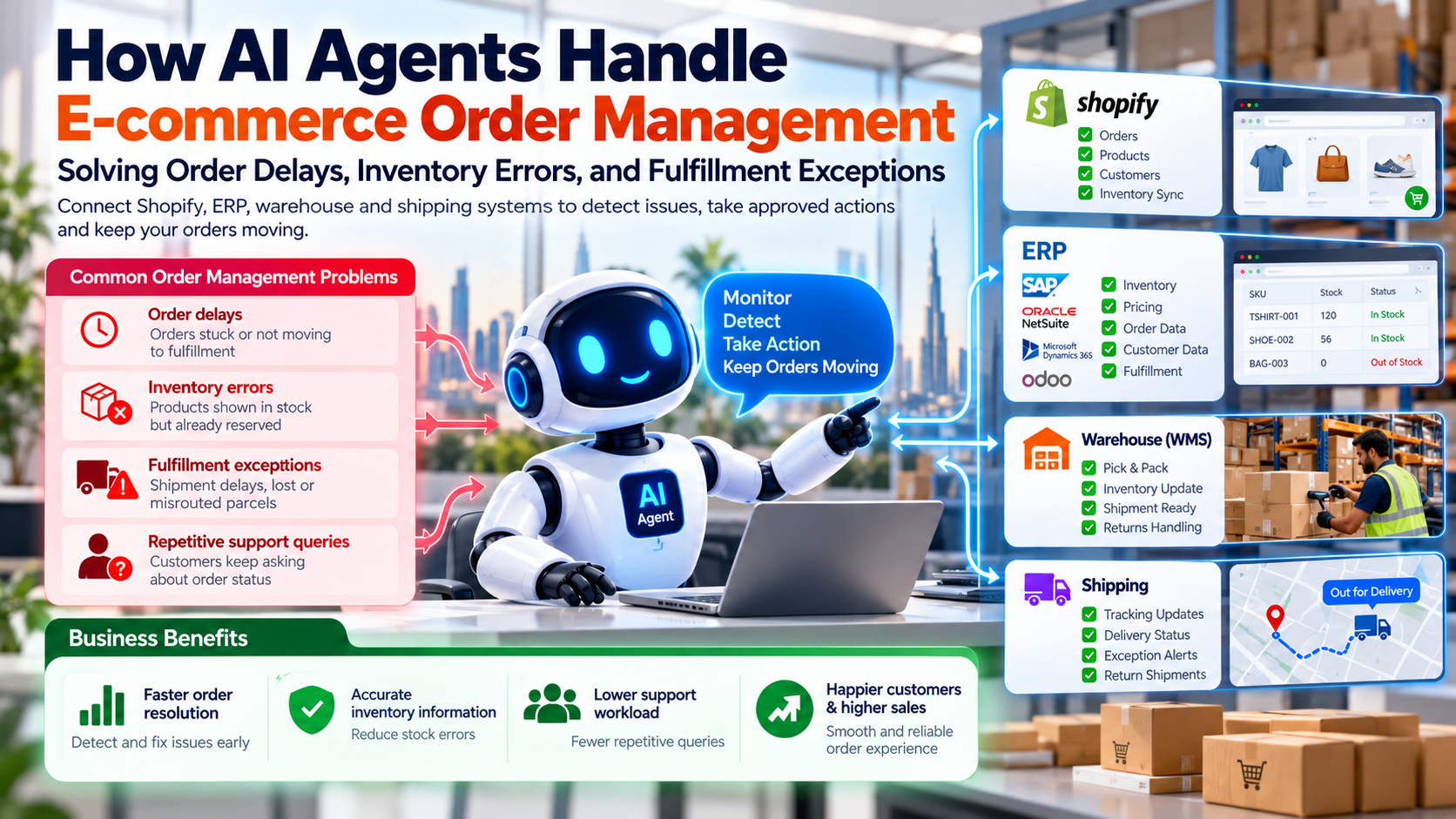
A product can look available on the storefront while the ERP shows that the stock is reserved, damaged, or sitting in another warehouse. This gap is why an AI chatbot for Shopify real-time inventory answers only work when the stock source is clear. Multiple warehouses make this harder. A store in Dubai may hold stock in a different location from the one that fulfills an order in Sharjah. Sales teams then spend time checking stock by hand before they can answer a simple question.
Delayed order tracking and fulfillment updates
Customers contact support to ask where their order is. A Shopify AI chatbot order tracking integration can remove much of this repetition, once the customer is verified. Shopify may show that an order is paid, while the ERP shows that the picking has not started. Support agents then check several dashboards to explain the status. Each extra check adds delay and creates room for error. An AI chatbot integration for Shopify order management should read these states from one agreed source.
Repetitive customer support requests
Questions about product specifications, delivery times, returns, and refunds take staff time every day. Automate Shopify customer support using AI in these areas first, starting with the questions that appear most often, and use an AI customer support chatbot that reads live data rather than static FAQ text. When answers are hard to find, shoppers may give up on a purchase. A chatbot that cannot see live stock or order data will often offer a generic answer, which does not solve the problem.
Pricing, product, and customer data inconsistencies
Product attributes, discounts, and B2B pricing can differ between the storefront and the ERP. A wholesale customer may see a retail price, or a discount may apply in one system but not in the other. Customer service agents then lack the information they need to resolve the query. Shopify B2B AI chatbot with ERP integration is where this matters most, because wholesale prices and credit terms usually live in the ERP.
The goal is not to add another chat window, but to deliver Shopify AI chatbot integration with real-time inventory and order data to your website. The goal is to connect customer conversations to the systems that hold the authoritative answers.
What does the latest UAE market research tell ecommerce businesses?
The UAE ecommerce market is large and growing. According to the EZDubai and Euromonitor International E-commerce Report, reported by Zawya, UAE e-commerce reached AED 42.2 billion (about USD 11.5 billion) in 2025, up from AED 17.6 billion in 2020, a compound annual growth rate of 19% over that period.
Shopper behavior is also changing. Visa's June 2026 study on AI and shopping in the UAE found that 85% of UAE respondents have used AI tools to help with shopping, and 93% said new technologies, including AI tools, make online shopping faster and easier. The same study found that only 32% would trust AI agents to complete checkout.
These figures point to a clear conclusion. Shoppers are comfortable with AI helping them research and compare, but they are much less comfortable with AI completing a transaction on their behalf. A chatbot that answers questions from verified data, and hands sensitive steps to a person, fits this pattern. It also means that the quality of the data behind the chatbot matters more than the chatbot's conversational style.
The market data does not prove that a Shopify and ERP integration will raise conversion or cut support costs by a specific amount. Custom AI chatbot development for Shopify is one way to act on these trends, but the data behind the chatbot decides whether it helps. Those outcomes depend on your own baseline and must be measured.
How does an AI chatbot work with Shopify and an ERP system?
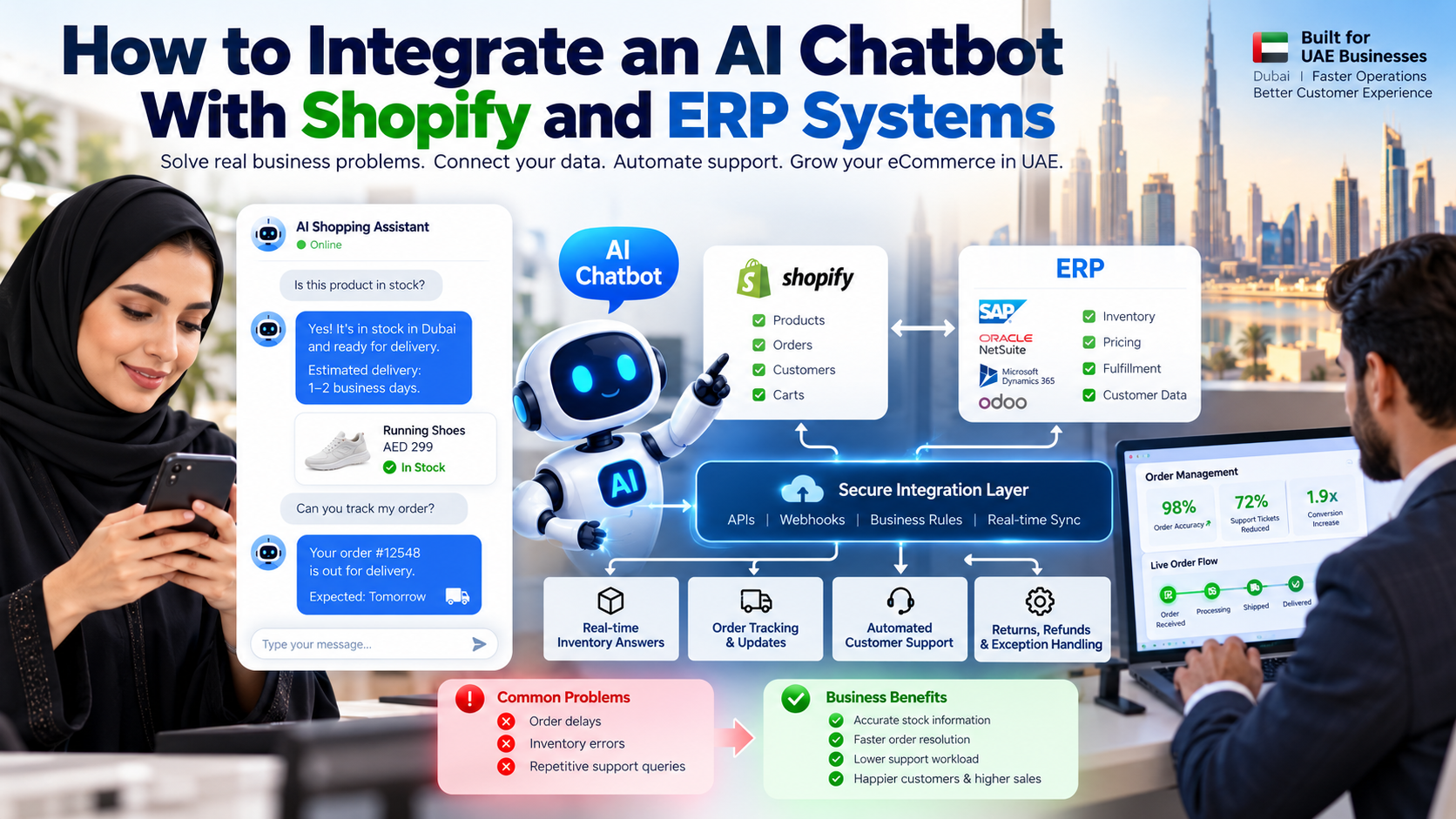
Think of the chatbot as the front door, not the system of record. Connect Shopify, ERP, and AI chatbot APIs through one integration layer rather than point-to-point links, so each change is controlled in one place. Enterprise AI chatbot integration with ERP software follows the same pattern. It understands what the shopper is asking, selects an approved tool, and returns a result. The integration layer does the rest: it checks permissions, calls the right API, validates the response, and logs what happened.
The flow works in four stages:
- The shopper asks a question on the storefront, such as whether a size is in stock.
- The AI chatbot or AI agent understands the intent and selects an approved tool.
- The secure integration layer checks authentication and business rules, calls Shopify or the ERP, validates the response, and logs the result. Shopify holds products, carts, orders, and customers. The ERP holds inventory, pricing, and fulfillment.
- The answer returns to the shopper, or the request is routed to a person if a rule requires it.
The integration layer controls which system can be queried or updated for each operation. This is the most important design choice in the whole project.
The role of each component
- Shopify APIs read or update the store information you permit, such as products, carts, and orders. Shopify documents its Admin GraphQL Order object, which exposes fields such as the display fulfillment status and line items. An agent that reads these fields can answer "Has my order shipped?" from the source system instead of guessing.
- ERP APIs or connectors provide inventory, enterprise pricing, fulfillment, and other records the ERP owns.
- Webhooks notify the integration layer when a supported event happens in Shopify, such as an order update, so the system does not have to check repeatedly.
- The AI model interprets the question and chooses the approved tool. It must not invent stock levels, prices, or order statuses.
- Business rules validate each request, enforce permissions, and decide when a person must approve an action.
Step-by-step guide to integrating an AI chatbot with Shopify and ERP systems
This is the core of the project. Each step should produce something you can review before you move to the next one.
Step 1: Identify the customer and operational use cases
List the questions your team answers most often. Identify the system that owns each piece of information. Start with high-volume, lower-risk tasks such as product information and order status. Define success criteria before you build anything, such as the share of stock questions answered correctly without a human.
Step 2: Audit your Shopify and ERP data
Review SKUs, product variants, warehouse locations, prices, customer identifiers, and order references. Look for duplicates and inconsistent records. Decide the source of truth for each field. Also decide what "stock" means for your store. Physical stock, available-to-promise stock, and reserved stock answer different questions, and a chatbot must use the right one.
Step 3: Choose the integration method
There are three common approaches:
- A prebuilt connector is quick to set up for standard workflows, but it may not support custom rules.
- An integration platform as a service (iPaaS) links systems through managed flows. It suits businesses that need several connections without a large custom build.
- Custom API development gives full control over business rules, error handling, and data mapping. It usually costs more and needs more maintenance.
The right choice depends on your ERP compatibility, the complexity of your workflows, your data volume, and who will maintain the integration after launch.
Step 4: Connect the Shopify and ERP APIs
Configure authentication and grant only the permissions the workflow needs. Our AI agent development services cover this design work. This is where the practical answer to how to connect a Shopify chatbot to ERP inventory data is found: map the records first, then design the calls. Map Shopify product, order, and customer records to the matching ERP records. Normalize identifiers, timestamps, currencies, and status values, so that "fulfilled" in one system means the same thing as "shipped" in the other. Build rate-limit handling, retries, and error logs from the start.
Step 5: Set up event-driven synchronization
Subscribe to the webhook events that matter, such as product, inventory, order, and fulfillment updates. This keeps a Shopify chatbot with live ERP stock data accurate between full syncs. Verify each webhook's signature, and discard repeated deliveries so that one event does not create two records. Add a scheduled reconciliation job that compares the two systems and finds missed or delayed updates.
Be realistic about timing. Near real-time synchronization is achievable in many architectures, but no design guarantees that every change appears instantly everywhere. Tell stakeholders the expected delay and monitor it.
Step 6: Connect the AI chatbot to approved tools
Create tools for product lookup, stock checks, order status, and return-policy retrieval. Custom AI chatbot for Shopify stores connected to ERP systems depends on scoping each tool to the business rules, and AI agent integration with ERP systems works the same way: every tool is an approved API call. Require customer verification before the chatbot shows private order details. For transactional answers, the chatbot should retrieve live records rather than rely on static training data. Use a knowledge base for policies and FAQs, but not as the only source for stock or order status, because those change constantly.
Step 7: Test, monitor, and deploy
Test normal, invalid, and ambiguous requests. Then test the failures that matter most: duplicate orders, failed webhooks, API timeouts, and inventory conflicts between the two systems. Launch with a limited set of use cases. Review answer accuracy, escalation rates, response times, and integration failures before you expand.
Which Shopify and ERP workflows should you automate first?
Not every workflow carries the same risk. The table below shows a practical order for most stores.
| Workflow | What the chatbot does | Business value to measure |
|---|---|---|
| Inventory availability | Checks authorized stock data for the SKU and location | Accuracy of stock answers |
| Order tracking | Retrieves fulfillment and tracking status after verification | Repeat status inquiries |
| Product recommendations | Matches customer needs to catalogue attributes | Assisted conversion rate |
| Returns and refunds | Explains the policy and starts eligible return workflows | Resolution time |
| B2B pricing | Retrieves authorized customer-specific prices | Quote response time |
| Order exceptions | Collects details and routes complex cases to a person | Time to resolve exceptions |
Refund approvals, cancellations, discounts, and other high-impact changes should follow explicit business rules and approval controls. An AI chatbot for Shopify returns and refunds automation can prepare the request, but approval stays with a person or an authorized workflow. The chatbot can prepare the request, but a person or an authorized workflow should approve it.
For example, a Dubai-based fashion retailer could let customers check size availability, delivery status, and return eligibility. The chatbot retrieves the size and location stock from the ERP, the order status from Shopify and the fulfillment system, and the return rules from the approved policy. If the item is damaged, the case moves to a support agent.
How can UAE businesses connect Shopify with SAP, Oracle NetSuite, Microsoft Dynamics 365, or Odoo?
Many UAE businesses run an ERP in addition to Shopify. Enterprise AI chatbot integration with ERP software, such as NetSuite, needs its own mapping, and Shopify AI chatbot integration with NetSuite ERP for order management is one common example covered below. The method depends on the ERP edition, its version, customizations, and the interfaces it exposes. The subsections below describe what each integration needs to cover. They are not claims that a prebuilt connector exists for every setup.
SAP
Map products, inventory, orders, and fulfillment records to the relevant SAP modules and interfaces. Confirm which API or middleware your SAP environment supports, and agree the synchronization direction for each record type before development.
Oracle NetSuite
Align item records, sales orders, available stock, customer records, and fulfillment states. Shopify AI chatbot integration with NetSuite ERP for order management depends on those states matching across both systems. NetSuite environments often include custom fields and workflows, so the mapping must be documented and tested.
Microsoft Dynamics 365
Identify the applicable modules, data entities, and integration endpoints for your deployment. Plan how inventory, pricing, and order status will move between Dynamics 365 and Shopify.
Odoo
Map products, stock locations, sales orders, and delivery records to the installed Odoo version and modules. Odoo deployments vary widely, so the integration design should start from your own installation.
For every system, cover compatibility, API access, record mapping, synchronization direction, and exception handling. The exact implementation depends on your ERP edition, customizations, Shopify plan, and any existing middleware.
How to build an Arabic and English AI chatbot for UAE ecommerce customers
Many UAE shoppers move between Arabic and English, sometimes within one conversation. An AI customer support chatbot serving UAE shoppers should handle that switch smoothly. Do not assume that every customer prefers the same language.
- Support English and Arabic if your business serves both language groups.
- Test Arabic product names, dialect variations, mixed-language questions, and right-to-left text display.
- Keep product names, SKU codes, prices, and delivery details consistent across languages.
- Provide a visible route to a human agent for misunderstandings or sensitive requests.
- Test the customer journey on the channels that are part of your integration scope, and only those.
A multilingual ecommerce chatbot is only as good as its translated content. Product descriptions, delivery rules, and return policies must match the market the customer is in, not only the words on the screen.
What are the security and data protection requirements in the UAE?
The main UAE reference point for personal data is Federal Decree-Law No. 45 of 2021 on Personal Data Protection. Confirm the current text and any sector-specific or free-zone requirements that apply to your business with qualified legal counsel.
From a technical standpoint, assess these practical safeguards:
- Least-privilege API scopes. Give each integration only the permissions it needs, and store credentials securely.
- Customer authentication. Verify the customer before showing personal order or account details.
- Encryption. Protect data in transit and, where appropriate, at rest.
- Retention rules. Set how long chat logs, order details, and support transcripts are kept.
- Data mapping. Document which systems hold each data type, where they are hosted, and any cross-border transfers.
- Audit and response. Keep access logs, define an incident response process, and define how deletion requests are handled.
Avoid the assumption that encryption or an established AI platform makes a solution automatically compliant. Shopify ERP integration Dubai projects should review these safeguards before design starts. Compliance depends on how the whole system is designed and operated.
How much does Shopify and ERP AI chatbot integration cost in Dubai?
We do not publish a fixed price for this work, because the scope varies widely. AI chatbot integration services UAE providers quote depend on the same drivers listed below. The main cost drivers are:
- ERP type, version, and API availability. An ERP with well-documented APIs is usually faster to connect.
- Number of systems, stores, warehouses, and sales channels.
- Complexity of verification and workflows. Refund rules, B2B pricing, and approval chains add build and testing effort.
- Language and channel requirements. Arabic and English support and messaging channels add content and testing work.
- Data cleanup and middleware. Duplicate records and inconsistent codes often take longer than expected.
- Hosting, monitoring, and support. These are recurring costs that should be budgeted from the start.
- Testing, compliance review, and staff training.
Ask for a scoped proposal that lists the integrations, workflows, assumptions, milestones, and recurring costs. A proposal that does not state its assumptions is hard to compare.
How do you measure the business results of an AI chatbot integration?
Set a baseline before launch, then run a controlled measurement period after deployment. Ecommerce workflow automation Dubai teams usually measure these figures before and after go-live. Track:
- Inventory answer accuracy, checked against a sample of stock records
- Order-status resolution time, from the first question to a confirmed answer
- Support tickets per order, as a measure of how clear the post-purchase experience is
- Containment rate, the share of conversations resolved without a human, read together with quality checks
- Human escalation and repeat-contact rates
- Assisted conversion rate and revenue per visitor
- ERP synchronization failures and recovery time
- Customer satisfaction, refund errors, and cancellation errors
Where useful, use a simple formula to track support load:
The basic formula is: ticket reduction (%) equals baseline tickets minus new tickets, divided by baseline tickets, multiplied by 100.
Do not promise a fixed reduction in support cost or a guaranteed conversion increase. Those results need evidence from your own store.
Why work with Cor Advance Solutions on Shopify and ERP AI integration?
Cor Advance Solutions is based in Ahmedabad, India, and works with UAE ecommerce businesses remotely. We do not present a local office or local client results on this page.
Our approach starts with the problem, not the tool: We are an ecommerce AI chatbot development company that serves UAE stores remotely from Ahmedabad, India, and custom AI chatbot development for Shopify stores is scoped from the same assessment.
- We assess your Shopify and ERP architecture before we recommend a solution.
- We map inventory, orders, customer records, and business rules to the systems that own them.
- We build secure API integrations and approved AI agent workflows, with the permissions set deliberately.
- We design exception handling and human approval into every sensitive operation.
- We test synchronization, reliability, and the accuracy of customer-facing answers.
- We agree measurable acceptance criteria before launch.
Planning to connect your Shopify store with SAP, NetSuite, Dynamics 365, or Odoo? our AI chatbot development for ecommerce in the UAE, or contact us to discuss your ecommerce workflows, ERP environment, and integration requirements. Our wider AI agent development and AI automation services cover the agent and workflow layers of the same project.
Frequently asked questions
Can an AI chatbot connect directly to Shopify and an ERP?
Yes. This is the first question most teams ask when they search for Shopify ERP integration Dubai options. It can use authorized APIs or connectors, usually through an integration layer that manages authentication, data mapping, business rules, and errors. Direct connections without that layer are harder to secure and maintain.
Can a Shopify chatbot show real-time ERP inventory?
It can retrieve current inventory when the ERP exposes suitable data and the integration handles delays, reservations, and stock rules correctly. A Shopify chatbot real-time inventory feature depends on that same design. Where synchronization is delayed, the chatbot should say that the information may not be current.
Can the chatbot track Shopify orders and delivery status?
Yes, if it has authorized access to order and fulfillment information and verifies the customer's identity where needed. It should report only the status the connected systems confirm.
Which ERP systems can connect to Shopify?
Common candidates include SAP, Oracle NetSuite, Microsoft Dynamics 365, and Odoo. The method depends on the ERP edition, version, customizations, and the interfaces available.
Does the chatbot need custom development?
Not always. A prebuilt connector or an iPaaS may be enough for standard workflows. Complex business rules, B2B pricing, or specialized ERP environments often need custom development.
Can the chatbot support Arabic and English?
Yes, if the model, interface, catalogue data, and testing process support both languages well. Test with native speakers before launch.
How long does implementation take?
It depends on the systems, the workflow scope, data quality, access approvals, and testing. We set the schedule after a technical assessment, not before.
How do UAE businesses protect customer data in these integrations?
Use least-privilege access, customer authentication, encryption, retention rules, and documented data flows. Confirm the legal requirements that apply to your business with qualified counsel.
Conclusion
Connecting an AI chatbot to Shopify and an ERP is less about the chatbot and more about the data behind it. If you are comparing AI chatbot integration services UAE providers, use this guide as a checklist, and ask each one how it will keep the AI customer support chatbot accurate. When the integration layer is designed well, shoppers get accurate answers about stock, orders, and returns, and your team gets fewer repetitive tickets and a clear path to a person when a case needs judgment. Start with one or two workflows, audit your data, agree the source of truth for each field, and measure the results against a baseline. If you want a scoped plan for your store, our AI automation services are a practical next step.