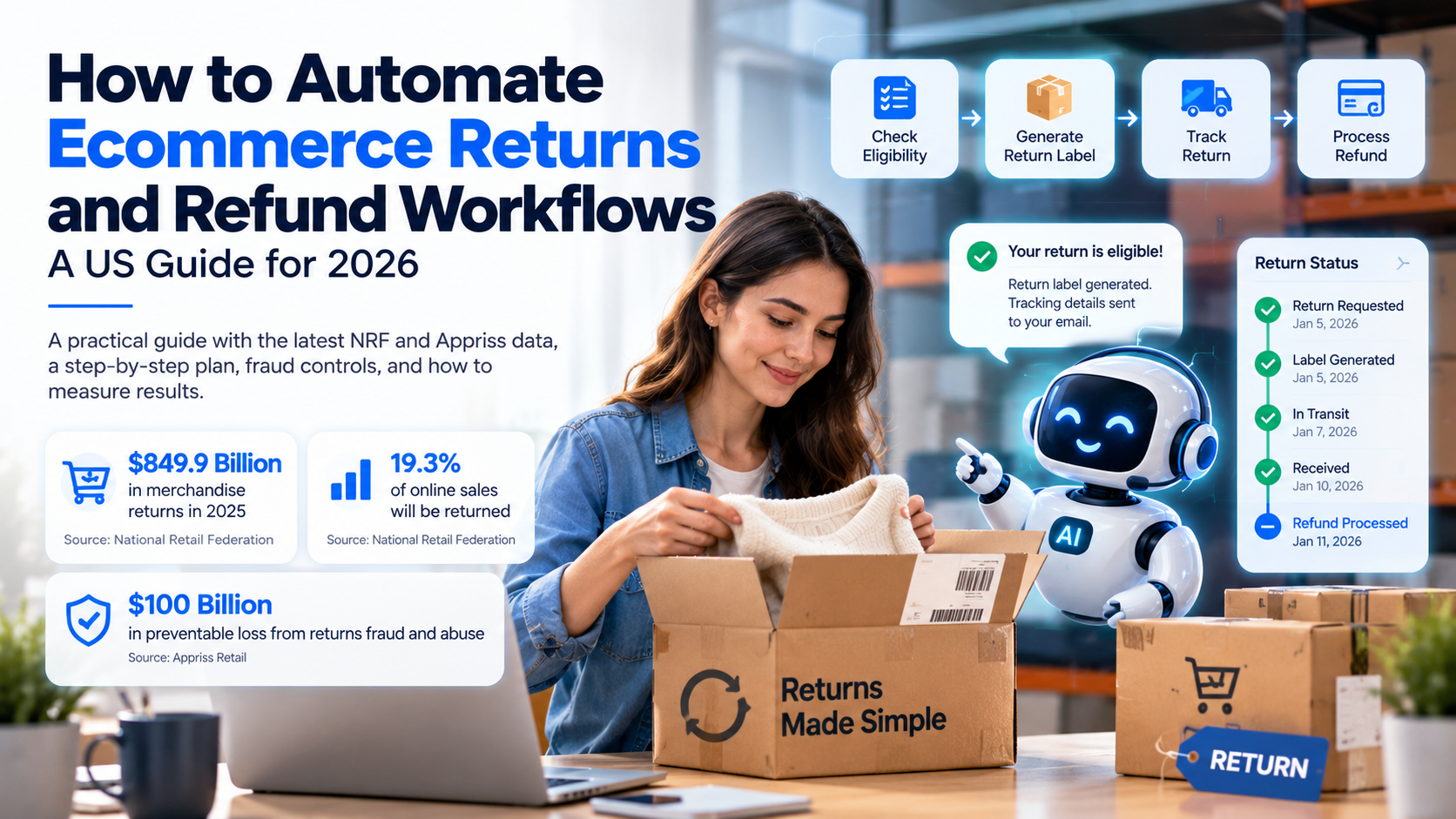
Returns and refunds are one of the most expensive parts of running an online store, and one of the most manual. The National Retail Federation estimates that consumers will return $849.9 billion in merchandise in 2025, and that 19.3% of online sales will be returned. Automating the repetitive parts of the returns process, such as eligibility checks, label creation, status updates, and refund routing, can cut handling time and reduce errors. The rules that matter most, such as refund approvals and fraud decisions, should stay under human control.
If you run a Shopify store or any online business in the United States, you probably know the routine. A customer emails asking if an item can be returned. Someone checks the order, reads the policy, creates a label, waits for the package, inspects it, and then issues a refund. Each step is simple. Together, across hundreds of requests a month, they consume a lot of staff time.
This guide explains how to automate ecommerce returns and refund workflows in a practical, controlled way. If your team also handles order questions, our AI customer support automation for e-commerce businesses in the USA covers the same systems from the support side. You will learn what the latest market data says, which steps are best to automate first, how to design the workflow, how to keep fraud and policy risks under control, and how to measure results. The goal is not to remove people from returns. It is to free them for the cases that need judgment.
Why returns are a bigger problem than they look
Returns affect more than the refund. Every return creates work across several teams. Customer support answers the question. Operations processes the package. Finance reconciles the refund. Inventory decides whether the item can be sold again. When one step is slow, the whole cycle slows down, and the customer waits.
The scale is large. In its 2025 Retail Returns Landscape, the National Retail Federation with Happy Returns projected total retail returns of $849.9 billion for 2025. The same report estimates that 19.3% of online sales will be returned, which is well above the rate for in-store sales. For a US store that sells online, returns are not an edge case. They are a normal part of the business.
Returns also carry risk. Appriss Retail's 2026 Total Retail Loss Benchmark Report reports $706 billion in merchandise returned in 2025 and says that 14.2%, or about $100 billion, was preventable loss from returns fraud and abuse. Abuse, such as wardrobing (buying an item to use and then returning it), is one of the patterns that makes return fraud prevention difficult to manage by hand. Manual processes make it hard to spot these patterns early.
What "automating returns" actually means
Ecommerce returns management automation does not mean approving every return with a click. It means letting software handle the tasks that follow clear rules, so people can focus on exceptions. A well-designed returns workflow usually does five things:
- Answers the request. It checks whether the item is eligible under your policy and tells the customer what to do next.
- Collects the details. It asks for the order number, reason for return, photos if needed, and preferred resolution such as refund, exchange, or store credit.
- Creates the logistics. It generates a return label or drop-off option and sends tracking details to the customer.
- Tracks the return. It updates the customer when the package is in transit, received, and inspected.
- Issues the resolution. It processes the refund or exchange once the required conditions are met, or routes the case to a person if they are not.
Each step can be automated to a different degree. Eligibility checks and status updates are usually the easiest to automate. Refund approvals for high-value or unusual cases should remain under human control. A well-built automated refund workflow keeps that split clear from the start.
Start with the steps that are repetitive and rule-based
The best candidates for automation share three traits: they happen often, they follow clear rules, and the data needed is already in your systems. For most online stores, that means the following.
Return eligibility. Questions such as "Is this within 30 days?" or "Is this item final sale?" have clear answers. An assistant can check the order date, product category, and policy and respond immediately.
Return initiation. Once a return is approved, the system can generate the label, set the return reason, and send instructions without a staff member copying details between tools.
Status notifications. Customers ask "Where is my refund?" more than almost any other question. Automatic updates at each stage prevent most of those contacts.
Refund routing. Refunds below an approved threshold, for orders that meet clear conditions, can be processed automatically. Anything outside those rules goes to a reviewer.
Steps that involve judgment should be handled differently. Damaged goods, disputed deliveries, suspected abuse, and high-value refunds need a person to review the evidence. Automation can prepare the case, but it should not make the final call.
Build the workflow before you buy the tool
Many businesses start by choosing a returns platform. A better order is to write down the workflow first. Map every step from the customer request to the final refund, and mark each decision point. For each decision point, answer three questions:
- What information does the decision need?
- Who or what is allowed to make it?
- What happens if the information is missing or unclear?
For example, a return request for a shoe bought 40 days ago might be declined automatically under a 30-day policy. But if the customer has an order that was delivered late, the policy might allow an exception. The workflow should route that case to a person rather than guess.
Once the workflow is clear, you can compare tools and integrations. The right choice depends on what you need to connect. A Shopify store, a warehouse system, a shipping provider, and a helpdesk each have their own data and permissions. Confirm that each connection supports the actions your workflow needs.
Connect the systems that hold the data
Returns automation fails when the workflow cannot see the data it needs. At a minimum, the system should connect to:
- Your e-commerce platform, for orders, line items, purchase dates, and refund status
- Your shipping or returns provider, for labels, tracking, and delivery events
- Your warehouse or inventory system, for receipt and inspection status
- Your payment provider, for refund execution and payment status
- Your helpdesk or CRM, for customer history and ticket updates
Integration design matters here. Use webhooks where they are available, so the workflow reacts to events rather than polling for changes. Make refund actions idempotent, so a repeated event does not issue two refunds. Log every action with a timestamp and the reason for it. These controls prevent the most expensive errors. If you need help designing these connections, our AI agent development services cover workflow design and system integration.
Set clear rules for refunds and exceptions
Automation works best when the rules are explicit. Write down the conditions under which a refund can be issued automatically. A common structure looks like this:
- Approve automatically: within the return window, unused, original condition, order below a set value, and no prior return flags.
- Route to review: outside the window but within a grace period, damage claims, high-value orders, or repeat returners.
- Decline with an explanation: outside the policy and not eligible for an exception.
These thresholds are business decisions, not technical ones. Set them with finance, operations, and customer support together. Review them every quarter, because return patterns change with seasons, product launches, and policy updates.
Customer communication also needs rules. Every automated message should say what happened, what the customer can do next, and how to reach a person. A decline should always include the policy reason and an option to request review. Never let an automated message promise a refund date that the system cannot confirm.
Protect the workflow from fraud and abuse
Returns fraud and abuse come in many forms. Some are simple, such as returning a different item in the box. Others involve fake tracking numbers or claims of non-delivery. Automation can help catch these patterns when the signals are well chosen.
Useful signals include:
- Return frequency by customer, address, or payment method
- Return rate by product, which can point to sizing or description problems as well as abuse
- Mismatches between the item returned and the item sold, flagged by weight, serial number, or photo review
- Time between delivery and return, especially for items returned just before the window closes
- Repeat claims of damage or non-delivery
Flags should trigger review, not automatic denial. A false positive can damage a good customer relationship, so keep a human in the loop for any action that blocks a refund. Track how often flags lead to confirmed abuse, and adjust the rules when the false-positive rate is too high.
Plan for the customer experience
Returns are often the moment customers decide whether to buy from you again. The process should feel simple and fair. Three principles help.
Be clear before purchase. A plain-language return policy on the product page reduces support contacts and sets expectations.
Make the request easy. Let customers start a return from the order page or a chat message, with no need to call or write a long email.
Keep people reachable. An automated workflow should always offer a path to a human, especially when a customer is frustrated or the request is unusual.
A good test: could a customer complete a standard return in under five minutes, and understand what happens at each stage? If not, the workflow needs work.
A step-by-step implementation plan
Here is a practical sequence for a US online store that wants to automate returns without taking on unnecessary risk.
Step 1: Measure the current process. Record the number of return requests per month, the average time from request to refund, the share of requests that need manual work, and the number of customer contacts per return. These numbers become your baseline.
Step 2: Document the policy and the exceptions. Turn the written return policy into a set of clear rules. List every exception your team currently makes, and decide whether each one should be automated, routed, or kept as is.
Step 3: Choose the first workflow. Start with one high-volume, low-risk step, such as eligibility checks and return label creation. Avoid starting with refund approvals.
Step 4: Connect the data. Integrate the order, shipping, and payment systems the first workflow needs. Test with real historical orders in a sandbox before you go live.
Step 5: Run in parallel. For two to four weeks, let the automated workflow make its decisions, but have staff check each result against what they would have done. Track disagreements and fix the causes.
Step 6: Expand carefully. Once accuracy is stable, add the next step, such as status notifications or low-value refund routing. Keep human approval for high-risk actions.
Step 7: Review every month. Check the baseline metrics, the fraud flags, and the customer feedback. Adjust thresholds and messages as needed.
How to measure the results
Measure outcomes that matter to customers and to the business, not only the number of automated steps. The most useful metrics include:
- Time to refund, from the moment the return is received to the moment the refund is issued
- Time to first response, for return requests
- Manual handling rate, the share of returns that need a person at any step
- Refund accuracy, the share of refunds that match policy after review
- Return-related contacts per order, a measure of how clear the process is
- Fraud and abuse detection rate, the share of flagged returns confirmed as abuse
- Cost per return processed, including labor, shipping, and system costs
Compare these against your baseline after each change. Be careful with any single metric. A fast refund that is issued incorrectly is not a win. Track speed and accuracy together.
Design a returns policy that automation can enforce
A policy only works in automation if a computer can apply it the same way every time. Vague wording such as "reasonable condition" or "within a short period" forces a person to decide each case. Write rules with specific inputs: the number of days since delivery, the product category, the item condition, and whether the order used a discount.
Keep the policy short enough for customers to read, and structured enough for your systems to follow. A good test is whether two different staff members would reach the same decision from the same order. If they would not, the rule needs rewriting before you automate it.
Return policy automation is only as good as the policy behind it. Your return policy also shapes your workflow. Shorter windows reduce abuse but can increase complaints. Restocking fees, store credit options, and exchange incentives each change the workflow. Decide these choices first, then build the automation around them.
Reverse logistics and restocking
Reverse logistics is the path a returned item takes back to your warehouse. It includes receiving, inspection, grading, repackaging, and restocking. Each handoff is a place where delays and errors happen.
Reverse logistics automation can help in three ways. It can notify the warehouse when a return is in transit, so staff prepare for it. It can record the inspection result against the order, so the refund decision uses accurate data. And it can update inventory once the item is graded for resale, so you do not sell stock that is damaged or not yet received.
Not every returned item goes back on the shelf. Items that cannot be resold may go to outlet channels, refurbishment, or recycling. The workflow should record that outcome, because it affects both inventory and the cost of each return.
Returns by channel: online, in-store, and buy online, return in store
Returns do not all arrive the same way. A customer might mail an item back, drop it at a carrier location, or bring it to a physical store. Each channel creates different data, different handling, and different risks.
Online returns usually produce the richest data. The order, shipping, and tracking records are all digital, so the workflow can check eligibility and status without staff involvement. These are the best candidates for full automation.
In-store returns are harder to automate because the item arrives in person, and staff must confirm its condition and the original purchase. Automation can still help by pulling the order record at the counter, showing the eligibility result, and logging the outcome. Store staff keep the final say on item condition.
Buy online, return in store (often called BORIS) needs extra care. The customer bought digitally but returns the item physically, so the system must match the store receipt, the order, and the payment method. Appriss Retail's report identifies this channel as a fast-growing source of fraud and abuse, which is one reason to add clear checks here.
Design the workflow for each channel separately, then share the common steps, such as refund routing and customer updates. This prevents one channel's rules from accidentally applying to another.
An example workflow for a Shopify store (illustrative)
The example below is hypothetical. It shows how the steps could fit together for a mid-sized apparel store. It is not a description of a specific customer.
A customer opens the order page and selects "Return an item." The system checks the order date, the item category, and whether the item was on final sale. It finds the order inside the 30-day window and the item eligible. It offers an exchange or a refund, and the customer chooses a refund.
The system generates a prepaid label and sends it with drop-off instructions. The customer receives a tracking link. When the carrier scans the package, the status updates automatically.
When the warehouse receives the item, staff record its condition in a short inspection form. If the item is in sellable condition and matches the order, the refund is released automatically under the approved threshold. If the item is damaged, or the weight or SKU does not match, the case goes to a reviewer with photos and the order history.
Throughout, the customer sees each stage. A declined refund includes the policy reason and a way to request a review. Every action is logged, so the team can audit any decision later.
Estimate the return on automation with a simple model
You can estimate the value of returns automation before you buy anything. Use a basic model with four inputs:
- Staff minutes per return before automation, from a time study of a typical week
- Loaded hourly labor cost for the staff who handle returns
- Returns per month from your order system
- Expected reduction in staff minutes after automation, based on the steps you plan to automate
Multiply the first three inputs to get the current monthly labor cost of returns. Multiply that by the expected reduction to estimate savings. Subtract the monthly cost of software, integrations, and ongoing support. The result shows whether the investment makes sense at your volume.
Keep the model honest. Do not count savings from steps you have not automated. Include the cost of exception handling, because those cases often take longer than standard returns. Revisit the model after three months with real data, and replace your estimates with measured results.
Customer messages that reduce return contacts
Most return contacts come from uncertainty. The customer does not know whether the return was received, when the refund will arrive, or what to do next. Clear, timely messages answer these questions before the customer has to ask.
Plan a short set of standard messages, one for each stage. Keep them plain, specific, and honest about timing.
- Return approved. Confirm the item, the refund or exchange option, the label, and the drop-off window.
- Return in transit. Share the tracking link and say when the carrier last scanned the package.
- Return received. Confirm that the warehouse has the item and say that inspection is next.
- Refund issued. State the amount, the payment method, and the typical time for the funds to appear. Banks and card issuers control the final posting, so avoid promising an exact date.
- Return declined. Give the policy reason in one sentence and explain how to request a review.
- Needs more information. Ask for one specific thing, such as a photo of the damage, and say what happens after the customer replies.
Avoid vague wording such as "your refund is being processed" when the system cannot confirm the stage. If the workflow is waiting on a person, say so. Customers accept a longer timeline more easily than a message that turns out to be wrong.
Test every template with real edge cases, such as split orders, partial refunds, and exchanges with a price difference. Those are the messages most likely to create follow-up contacts.
Common mistakes to avoid
- Automating the policy before clarifying it. If the policy is vague, the automation will be inconsistent.
- Starting with refunds. Refund actions carry the most financial risk. Start with the simpler steps.
- Ignoring exceptions. Exceptions are where customers feel the most frustration. Design a clear route for them.
- Using fraud flags as automatic denials. Flags should prompt review, not refusal.
- Skipping the integration tests. Test with real order data before launch, including edge cases such as split shipments and partial refunds.
- Forgetting the team. Staff who handle exceptions need training and a clear escalation path.
Frequently asked questions
How do you automate ecommerce returns and refunds? Automate the repetitive steps first, such as checking return eligibility, creating return labels, sending tracking updates, and routing approved refunds. Connect your store, shipping, payment, and helpdesk systems so the workflow can see the order data it needs. Keep refund approvals for high-value, damaged, or unusual cases under human review, and test every rule against real orders before you go live.
What should be automated first in a returns workflow? Start with eligibility checks, return label creation, and status notifications. These steps happen often, follow clear rules, and carry low financial risk. Refund approvals for exceptions should come later, after the workflow has proven accurate in a parallel test.
How can AI help reduce return fraud without blocking good customers? AI can flag patterns such as high return frequency, repeat damage claims, or mismatched items. Flags should send a case to review rather than deny a refund automatically. Track how often flags lead to confirmed abuse, and adjust the rules when too many good customers are flagged.
Can Shopify returns automation issue refunds on its own? Yes, for orders that meet clear, pre-approved conditions, such as being inside the return window with no flags and below a set value. The exact setup depends on your Shopify configuration, apps, and payment provider. Anything outside those conditions should go to a person.
What is the average return rate for online stores in the US? The National Retail Federation and Happy Returns estimate that 19.3% of online sales will be returned in 2025. Rates vary a lot by category. Richpanel's 2026 category benchmarks place apparel and footwear at the high end, and electronics and beauty at the low end. Treat these as ranges, since definitions vary by source. Compare your own rate by category rather than relying on one average.
How long should a return take to process? There is no single standard, because timing depends on shipping, inspection, and the type of refund. Many teams aim to issue refunds quickly after the item is received and inspected, and they tell customers each stage in advance. Measure your current time to refund, then set a target that fits your operations.
Will automating returns reduce my support team's workload? It can reduce repetitive contacts, such as "Where is my refund?" and "Is this item returnable?" Your team will still handle complex cases, disputes, and sensitive customer situations. Plan to redeploy that time to those cases rather than cut headcount alone.
Next steps
If you want to test returns automation, start small. Pick one high-volume step, measure it, connect the data it needs, and run it alongside your current process for a few weeks. If your team also handles order questions and support tickets, the same systems can power support workflows too. For rule-based process automation across operations, see our AI automation services.