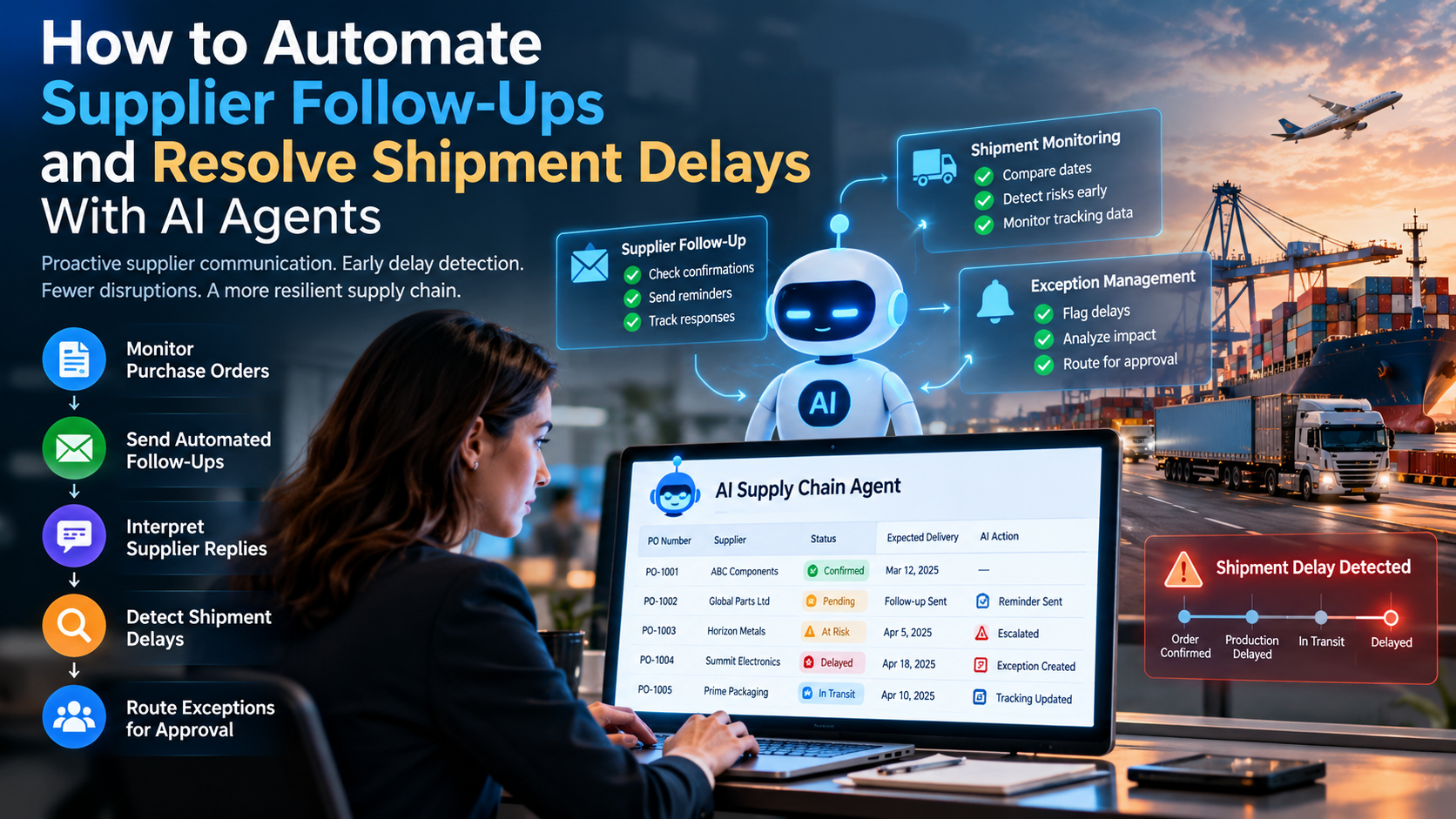
AI agents can automate supplier follow-ups and detect shipment delays by monitoring open purchase orders, identifying missing confirmations, sending scheduled reminders, interpreting supplier replies, comparing promised dates with shipment events, and routing exceptions to the right person before a delay becomes a stockout. The shift is from reactive supplier chasing to proactive shipment exception management. Results depend on data quality, integration coverage, supplier responsiveness and the rules your business sets.
A supplier confirms a purchase order but never gives a dispatch date. Another supplier emails that production is delayed, and the message gets buried in a busy inbox. Meanwhile, a critical component is running low, procurement is waiting for an update, and production planning still works from the original delivery date.
By the time someone notices the delay, there may be very little time left to prevent a stockout, a production disruption or a missed customer commitment. AI agent development services can help close that gap before it grows. For procurement teams managing dozens or hundreds of active purchase orders, this is not only a communication problem. It is a coordination problem involving disconnected systems, unstructured supplier messages, delayed information and manual decisions.
Unlike a basic reminder rule, an AI agent can interpret supplier responses, compare commitments against purchase order data, identify exceptions and prepare context-aware actions. With the right integrations and approval controls, it can support the workflow from order confirmation through delivery and goods receipt.
In this guide we explain how to identify supplier communication bottlenecks, design an AI-assisted follow-up workflow, detect delays earlier, and implement an automation system that works with the procurement and logistics software you already use.
Quick answer: How can AI agents automate supplier follow-ups and resolve shipment delays? They monitor open purchase orders, flag missing confirmations, send reminders, interpret supplier replies and update delivery information in connected systems. They compare promised dates with shipment events and production requirements, flag potential delays and route exceptions to the responsible person. The result is earlier intervention, not a promise that every shipment will arrive on time.
The real business problem: why supplier follow-ups become a bottleneck
Most businesses already run an ERP, a procurement platform, an inventory system or a transport management system. Yet supplier coordination often still depends on manual work. A purchase order sits in the ERP, supplier communication happens by email or WhatsApp, tracking data lives on a carrier portal, and production requirements sit in a separate planning tool.
Each tool holds part of the answer. The gap is connecting those pieces at the right time.
Problem 1: Procurement chases suppliers for confirmations by hand
After issuing a purchase order, buyers need to know whether the supplier has accepted it, whether the quantity is available, whether production has started, what the committed dispatch date is, and whether the expected delivery date is still achievable. When suppliers do not respond, someone has to remember which orders are outstanding, search old email threads and send each follow-up individually. This gets harder as order volumes and supplier counts grow.
Business impact: unacknowledged orders go unnoticed, commitments stay unverified and buyers lose time that should go to critical sourcing issues.
Problem 2: Supplier updates are scattered across channels
A supplier may confirm an order by email, send a revised date by WhatsApp and share the dispatch document separately. Without a connected workflow, the buyer copies details into spreadsheets or ERP records by hand. This creates risks: teams work from different dates, planners miss updated commitments and important messages are overlooked.
Business impact: the organisation has no consistent, current view of supplier commitments.
Problem 3: Shipment delays are discovered too late
A delay rarely starts with a tracking alert that says "delayed". The first warning is often a missed confirmation, an unmet dispatch commitment, a revised production date, a missing tracking number, or a carrier status that has not moved as expected. If these signals are checked only when someone reviews an order manually, the warning can pass unnoticed until the promised date has already gone.
Business impact: the team loses the chance to investigate early, arrange alternatives or adjust plans before the delay reaches production or customers.
Problem 4: Supplier replies do not turn into action automatically
Consider this supplier email: "We are experiencing a production issue. Your order will be dispatched next Thursday instead of Monday." A person must find the right purchase order, extract the revised date, compare it with the original commitment, judge the operational impact and decide who needs to know.
A conventional email rule can classify that message. A well-designed AI agent can go further: it extracts the commitment, matches it to the correct order, checks the change against business rules, and creates a reviewable exception.
Problem 5: Escalation is inconsistent
Some suppliers get prompt reminders; others are chased only after repeated delays. A critical component may receive the same follow-up as a nonessential supply. Without clear escalation policies, teams spend time on low-priority issues while urgent delivery risks compete for attention.
How these problems affect different industries
The value of follow-up automation depends on the cost of a late shipment in each sector.
- Manufacturing and automotive: a delayed component can disrupt the production schedule. Agents can flag missing confirmations and escalate components that threaten planned output.
- Retail and e-commerce: delayed replenishment can leave high-demand products unavailable. Agents can rank late purchase orders by stock coverage, demand and urgency.
- Pharmaceuticals and healthcare supply: delayed medical supplies or temperature-sensitive products need faster intervention and documented handling. Agents can flag missing shipping updates and route exceptions to authorised staff. They must never bypass storage, safety or compliance requirements.
- Wholesale, distribution and import operations: international shipments are affected by customs clearance, missing documents and changing arrival estimates. Agents can gather updates, identify missing paperwork and escalate shipments that need a person.
The core technology is similar across sectors, but prioritisation rules, delivery tolerances, escalation thresholds and approval requirements must be set for each business.
Why basic follow-up automation is not enough
Traditional automation works well when a process follows a predictable sequence, such as a reminder 48 hours after a purchase order is issued. Supplier communication rarely follows one pattern. One supplier gives a firm date, another gives a vague update, a third reports a partial shipment or a quantity mismatch, and a fourth does not respond at all.
| Capability | Basic workflow automation | AI agent-enabled workflow |
|---|---|---|
| Follow-up reminders | Sends on fixed schedules | Selects follow-ups using order context and response history |
| Supplier replies | Routes with fixed rules | Extracts dates, quantities and exceptions from natural language |
| Shipment monitoring | Triggers on defined events | Combines tracking events with order context and delivery requirements |
| Exception handling | Escalates predefined conditions | Classifies the exception and prepares a recommended next action |
| System updates | Writes predefined values | Proposes or performs permitted updates after validation |
AI agents do not replace rule-based automation. In a reliable design, deterministic rules handle deadlines, permissions, calculations and validation, while AI handles variable language, context and exception analysis. Analysts also see the same pattern: the Gartner 2030 forecast expects intelligent agents to execute supply chain decisions autonomously in about half of supply chain software by 2030, which is why governance and approval design matter as much as the technology.
The solution: an AI-assisted supplier follow-up and shipment exception workflow
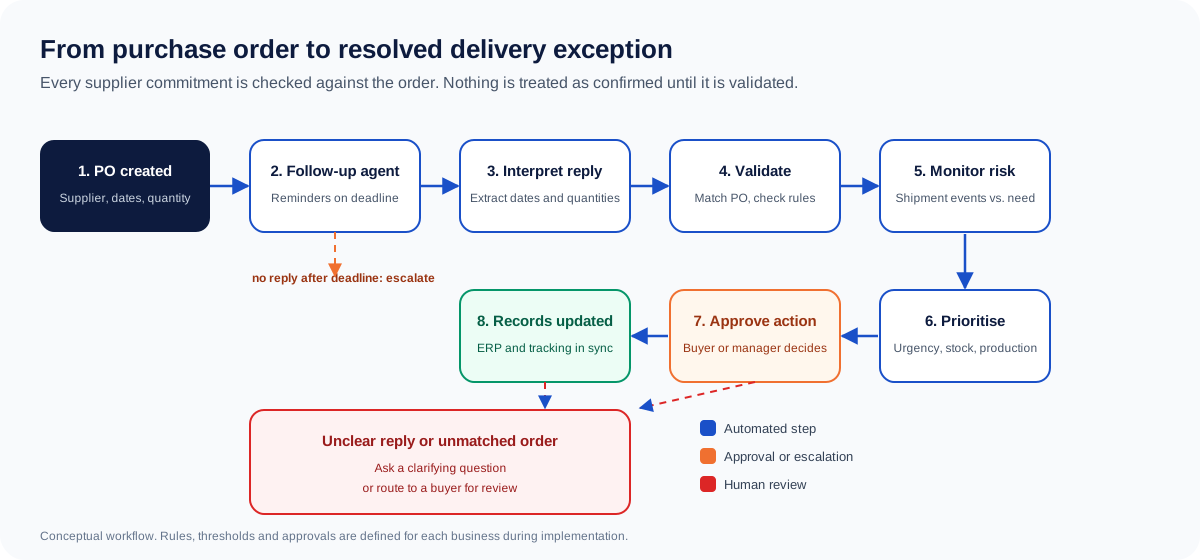
The recommended approach is a connected workflow that monitors purchase orders, communicates with suppliers, interprets responses, checks shipment progress and coordinates exceptions. Rather than building a separate chatbot, the agents plug into the process your team already uses.
Step 1: Connect purchase order and supplier data
The system collects the information needed to manage each active order: PO number and line item, supplier and approved channel, item identifier, ordered and confirmed quantities, requested and confirmed dates, production dependency, tracking reference, and the responsible buyer. The data can come from an ERP, a procurement application, an approved spreadsheet or an integrated order system.
Agents must match supplier messages to the correct order using stable identifiers. Matching by supplier name alone is not enough when one supplier handles many orders.
Step 2: Identify purchase orders that need follow-up
If your business requires a supplier to acknowledge an order within two business days, the system checks each order against that deadline. When it passes, the workflow confirms the order is still open, checks that no reminder is already pending, generates a follow-up that references the correct order, sends it if authorised (or submits it for approval) and records the attempt.
A typical reminder asks the supplier to confirm acceptance, the dispatch date and the delivery date, and to share a revised timeline if the schedule cannot be met. The message content comes from verified order data, not from free-text generation by the model.
Step 3: Interpret supplier responses instead of only storing them
A supplier reply may contain an acknowledgment, acceptance or rejection of quantity, a firm or tentative date, a partial shipment proposal, a production delay, a request to change price or terms, or a question. An agent extracts these details and compares them with the purchase order.
Consider: "We have completed 300 units. The remaining 200 units will be ready next Wednesday." The agent should not mark the order as confirmed. It should recognise a partial shipment, separate the quantity ready now from the outstanding quantity, extract the dates and flag anything unclear. If the reply is ambiguous, the correct action is to ask a clarifying question or route it to a buyer, not to guess.
Step 4: Compare new commitments with the original plan
Each response is checked against the existing commitment. The system distinguishes the requested date, the supplier-confirmed date, the carrier's estimated arrival, the actual dispatch date and the actual receipt date, because they are different events.
If a confirmed date of 20 October moves to 24 October, the system calculates the change and checks it against working-day rules and operational tolerance. The delay alone does not set the severity. Four days may be manageable for a noncritical item with ample stock, but the same delay can require immediate action for a component needed tomorrow.
Step 5: Detect shipment risks before the expected date
Monitoring combines signals from supplier messages, carrier tracking, logistics platforms and internal systems. Useful signals include a passed dispatch deadline with no dispatch confirmation, no tracking number by the agreed date, a shipment stuck in one status beyond a set threshold, an estimated arrival that moves past the required date, a customs or documentation hold, a production delay announced before dispatch, or a revised ETA that conflicts with production needs.
Not every signal proves a delay. A missing tracking update may be a carrier integration problem, not a late shipment. The agent should separate confirmed delays, predicted risks and missing information. Predictive tools can already flag likely late shipments and explain the main drivers, such as vendor, transport mode or country, giving managers time to act; DataRobot's late-shipment prediction documentation describes this capability.
Step 6: Prioritise by actual business impact
Not every delay should go to the same queue. Exceptions are scored using business-approved factors:
| Risk factor | What the agent evaluates | Why it matters |
|---|---|---|
| Delivery urgency | Time left until the required date | Shows what needs attention now |
| Inventory coverage | Stock on hand against expected use | Shows whether the delay could cause a stockout |
| Production dependency | Whether the item feeds a scheduled production order | Shows potential operational disruption |
| Supplier reliability | Past on-time and response records | Shows where closer monitoring helps |
| Recovery options | Approved alternative suppliers or stock transfers | Shows what mitigation is possible |
| Financial exposure | Expedite costs, penalties or lost contribution | Supports proportionate escalation |
Orders are classified as on track, at risk, delayed or requiring immediate intervention. These categories must be defined by the business. The AI model should not invent them.
Step 7: Recommend recovery actions, with approval
Depending on the integrations available, the agent can prepare options such as requesting a firm recovery date, evaluating a partial shipment (if the purchase order allows it), checking stock at another approved location, requesting an expedited shipping quote, or escalating to the owner in procurement, planning, inventory or logistics.
The agent should not select a new supplier, approve extra spending, change contract terms or promise a new delivery date to a customer unless that action is explicitly authorised under validated rules. For consequential decisions, it presents the evidence, the expected impact, the options and the approval needed.
Step 8: Escalate nonresponsive suppliers automatically
A reminder cycle should not continue forever. A configurable policy might look like this:
| Trigger | Automated response | Owner |
|---|---|---|
| Confirmation deadline missed | Send the first follow-up | Buyer or supplier contact |
| First follow-up unanswered | Send a second request after the approved interval | Assigned buyer |
| Critical order still unconfirmed | Open a high-priority exception | Procurement manager |
| Promised dispatch date missed | Request a status update and evidence of dispatch | Buyer or logistics coordinator |
| Delivery date at risk | Notify affected teams | Procurement and planning |
| Recovery needs extra spending | Prepare a recommendation for approval | Authorised manager |
Timing should reflect order criticality, supplier agreements, local working hours and the channel used. When a supplier replies, pending reminders are cancelled, the order is reassessed, and monitoring continues only if an issue remains open.
Step 9: Keep ERP, procurement and logistics records in sync
A supplier reply should not stay trapped in an email thread. Once matched and validated, the update is written to the relevant records, or a proposed change is queued for approval. This can include acknowledgment status, the revised commitment date, the tracking reference, partial quantities, the exception category and severity, the last contact date, the next follow-up deadline, the owner and the escalation status.
Every material update keeps the original commitment, the new information, its source and the time it was recorded. A supplier's proposed date stays separate from the official order commitment until an authorised user accepts it.
Example: resolving a delayed manufacturing shipment
The following scenario is hypothetical and is shown to explain the workflow. It is not a real customer result.
A manufacturer orders 1,000 units of a component. The supplier confirms delivery by 20 October. A later email says production problems push delivery to 24 October. Current stock covers only part of the next production run, which depends on the outstanding units arriving on time.
The workflow:
- Detect: the agent finds the revised date in the email and matches it to the open purchase order.
- Validate: it compares the revised date with the original commitment and the required date.
- Assess: it checks stock coverage and identifies the production run exposed to the delay, if those records are accessible.
- Contact: it drafts a message asking whether any units can ship earlier, and requests a firm recovery plan.
- Escalate: it notifies the buyer and the production planner, because the delay could stop the line.
- Resolve: an authorised employee evaluates a partial delivery, alternative stock or expedited shipping. The decision is recorded and monitored.
In a manual process, one person reads the email, finds the order, checks inventory, drafts the supplier message and calls planning. In the AI-assisted process, the system does most of the gathering, comparison, drafting and routing. People still make the decisions that need commercial judgement or authority. The gain is earlier, better-organised action, not a guarantee that the shipment arrives on time.
Architecture: what a production system needs
A production solution needs more than a language model and an email connection. It needs reliable business data, defined workflow states, controlled access to systems, and a way to confirm that each action completed.
- Data and event layer: ERP, purchase orders, supplier inboxes, carrier tracking, inventory, production planning and approved documents.
- AI interpretation layer: supplier message extraction, order matching, commitment classification, ambiguity detection and exception summaries.
- Rules and decision layer: date validation, risk thresholds, escalation rules, duplicate prevention, permitted actions and approval requirements.
- Workflow execution layer: drafting or sending follow-ups, creating tasks, requesting approvals, updating permitted fields and coordinating recovery steps.
- Monitoring and audit layer: exception dashboards, action history, delivery outcomes, integration failures and performance reports.
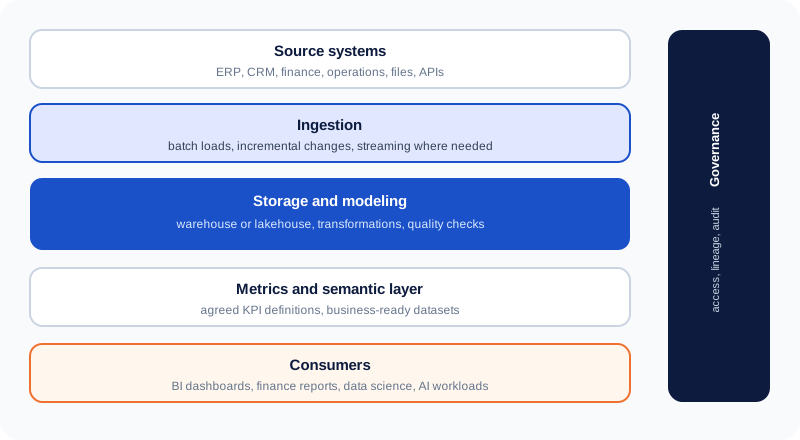
Not every layer needs a separate AI agent. Start with the simplest architecture that handles the workflow reliably, and add specialised agents only where they improve control, separation of responsibility or performance.
Integrations: connecting to the systems you already run
The system is only as useful as its access to accurate data and its ability to act within permission. Likely integration points include:
- ERP and procurement (for example SAP, Oracle, Microsoft Dynamics) that hold purchase orders and supplier records.
- Email and collaboration such as Microsoft 365 or Gmail, or other approved messaging channels.
- Carrier and logistics systems through carrier APIs, tracking services or transport management systems.
- Inventory and production planning for stock levels, replenishment needs and production dependencies.
- Workflow and reporting for approval queues, dashboards, notifications and audit logs.
Integration scope depends on API access, licensing, vendor limits, data permissions and the reliability of shipment events. Where a system has no API, an approved connector or a controlled document-ingestion process may be possible. Browser-based automation needs care, because interface changes can break it. The goal is not to replace your ERP. It is to connect it so supplier communication triggers the right action without creating another disconnected tool.
How to implement it, step by step
Avoid automating every supplier workflow at once. A focused rollout makes data validation, measurement and trust easier to establish.
- Map the current workflow. Document how orders are issued, when suppliers must respond, how dates are recorded and who handles delays. Mark the manual follow-ups and handoffs that cost the most time.
- Choose a narrow, measurable pilot. Start with one supplier category, one business unit or a defined set of purchase orders, with clear success measures.
- Prepare the data. Validate PO identifiers, supplier contacts, original dates, item criticality and status. Resolve duplicates, and define how partial shipments and revised dates are represented.
- Build the integrations and follow-up logic. Connect the systems, implement deadline monitoring, set up message templates, and build the matching of supplier replies to orders.
- Test with realistic exceptions. Include missing acknowledgments, conflicting dates, ambiguous replies, partial shipments, duplicate emails and integration failures. Confirm that the agent never updates the wrong order or treats a tentative date as confirmed.
- Deploy with approval controls. Run in draft-only mode first and compare the agent's recommendations with buyers' decisions. Enable automatic sending or low-risk updates only after testing and authorisation.
- Measure and expand gradually. Compare results with the baseline. Investigate wrong matches, missed exceptions and excessive reminders before adding suppliers or workflows.
Timelines depend on integration complexity, supplier channels, data quality, security requirements and the number of workflows. They should be estimated after a technical and operational assessment, not promised in advance.
Measuring the business impact
A business case should measure operational change, not general claims about AI efficiency.
| KPI | How to measure it | What it reveals |
|---|---|---|
| Manual follow-up hours | Time spent chasing suppliers each week | Whether repetitive work falls |
| Supplier acknowledgment time | Time from PO issue to acknowledgment | Whether confirmations come sooner |
| Overdue unacknowledged POs | Open orders past the confirmation deadline | Whether follow-up coverage improves |
| On-time delivery rate | Deliveries by the agreed date ÷ eligible deliveries | Whether delivery performance changes |
| Delay detection lead time | Time between the first warning and the required date | Whether the team has more time to respond |
| Exception resolution time | Time from identification to documented resolution | Whether coordination improves |
| False-alert rate | Alerts that did not reflect the defined risk | Whether the rules are reliable |
| Automation exception rate | Cases needing manual handling | Where the workflow still needs work |
Use a defined measurement period and a consistent baseline. Separate the effect of the automation from supplier performance changes, seasonality, freight conditions and demand swings.
A simple ROI model
Annual labour savings = hours saved per week × loaded hourly cost × working weeks. Annual net benefit = labour savings + verified avoided costs − annual operating costs. ROI (%) = (annual net benefit − initial implementation cost) ÷ initial implementation cost × 100.
Illustrative calculation (hypothetical assumptions): if a team saves 12 hours a week at a loaded cost of 30 per hour over 48 working weeks, labour savings are 17,280. Add 8,000 of verified avoided disruption cost and subtract 6,000 of operating cost, for a net benefit of 19,280. With 12,000 of implementation cost, first-year ROI is about 61%. These numbers are assumptions for demonstrating the method, not results from a real deployment. Count avoided costs only when records support them, and avoid counting the same saving twice.
Common mistakes to avoid
- Automating reminders without order context. A reminder system can send messages on time but cannot tell whether an order is still open or whether a date has changed. Connect reminders to order status.
- Treating every reply as a confirmed commitment. "We expect to dispatch next week" is not a firm date. Separate tentative and confirmed dates, keep the source message, and ask when unsure.
- Treating missing tracking data as proof of delay. The carrier feed may be down, or the supplier may not have uploaded the tracking number yet.
- Sending too many follow-ups. Set quiet periods, reminder limits and duplicate prevention, and stop reminders as soon as a reply arrives.
- Letting the agent make unrestricted procurement decisions. Supplier changes, extra spending, contract changes and production rescheduling need role-based permissions, spending limits and approval gates.
- Ignoring security and audit. Supplier messages can contain pricing, contract terms and attachments. Apply least-privilege access, protect credentials, validate external inputs, and keep logs. Supplier text must not be allowed to override the agent's instructions.
- Ignoring integration failures. Plan for retries, error queues, duplicate-safe execution, alerts and a manual recovery path.
When should a business invest in AI supplier management?
It is a strong candidate when buyers regularly spend significant time chasing confirmations, supplier updates arrive through several channels, order volumes make manual monitoring hard, late deliveries cause avoidable escalations, order records are reliable but communication is fragmented, and there are clear rules for follow-ups, tolerances and escalation.
A different fix may be more appropriate if supplier communication is already highly structured, order volumes are very low, or the real problem is inaccurate master data. AI cannot compensate for missing purchase order records, undefined responsibilities, unreliable stock data or supplier agreements that do not state clear commitments. Confirm the root cause before investing.
How Cor Advance Solutions can help
Supplier follow-ups and shipment delays are operational problems that span procurement, inventory, logistics, planning and enterprise software. Cor Advance Solutions can help you design a workflow that connects these activities:
- AI agent development: agents that interpret supplier messages, extract order commitments and prepare context-aware follow-ups.
- AI automation: reminders, escalation of unanswered orders, exception routing and approval coordination.
- Data integration and analytics: connecting procurement, ERP, inventory and shipment data into one operational view.
- Agentic AI solutions: coordinated agents for exception management, with permissions, approvals and monitoring.
The right scope depends on your current systems and operating requirements. The goal is to automate repetitive coordination while keeping people in control of high-impact commercial and operational decisions.
Start with one workflow. If your buyers spend too much time chasing suppliers, updating spreadsheets and investigating delays, pick one workflow to automate and measure first. We can assess the process, identify the required integrations and design an AI-assisted workflow that fits your procurement and supply chain operations.
Frequently asked questions
What are AI agents for supplier management?
They are software systems that use AI to interpret supplier communications, monitor purchase orders, track commitments, identify exceptions and coordinate permitted actions. They automate repetitive follow-ups and help procurement respond to supplier risk faster.
How can AI automate supplier follow-ups?
AI can monitor open purchase orders, detect missing acknowledgments, generate context-aware reminders, interpret replies, extract delivery dates and record validated updates. It can escalate unanswered requests based on supplier-specific deadlines and business rules.
Can AI agents detect shipment delays before delivery?
Yes, as an early warning. They compare supplier commitments, carrier tracking events, estimated arrival dates and required delivery dates. Early detection depends on how timely those signals are. A missing update alone does not prove a delay.
How do AI agents help prevent stockouts caused by late suppliers?
They flag delayed orders, compare expected arrival with stock and demand, and alert planners when coverage becomes thin. They can recommend options such as checking alternative stock or requesting a partial shipment, subject to rules and approval.
Can AI agents integrate with SAP, Oracle or Microsoft Dynamics?
Yes, where suitable APIs, connectors or approved integration methods exist. The project must account for permissions, data models, licensing and the specific software versions in use.
What is the difference between AI agents and traditional workflow automation?
Traditional automation runs predefined steps when conditions are met. AI agents also interpret unstructured information, assess context and recommend or start permitted next steps. Reliable enterprise designs combine AI with deterministic rules, validation and human approval.
Can AI agents send emails to suppliers automatically?
Yes, if the business explicitly authorises it and the workflow has validation, access control and safeguards. Many implementations start in draft-only mode, with human approval, before enabling automatic sending.
How do you measure the ROI of supplier follow-up automation?
Track reductions in manual follow-up hours, faster supplier acknowledgments, quicker exception resolution and verified reductions in disruption cost, compared with a baseline. Include implementation, integration, licensing and running costs.
Is AI supplier follow-up automation suitable for small and midsize businesses?
It can be, when follow-ups are frequent, delays are costly and the data is accessible. A focused workflow on existing tools is often more practical than a large enterprise-wide rollout.
Does AI eliminate shipment delays?
No. It cannot prevent supplier production problems, carrier disruption, customs holds or other events. It helps you see risks earlier, communicate faster and coordinate recovery. Delivery outcomes still depend on factors outside the system's control.